PaddleOCR-VL Introduction
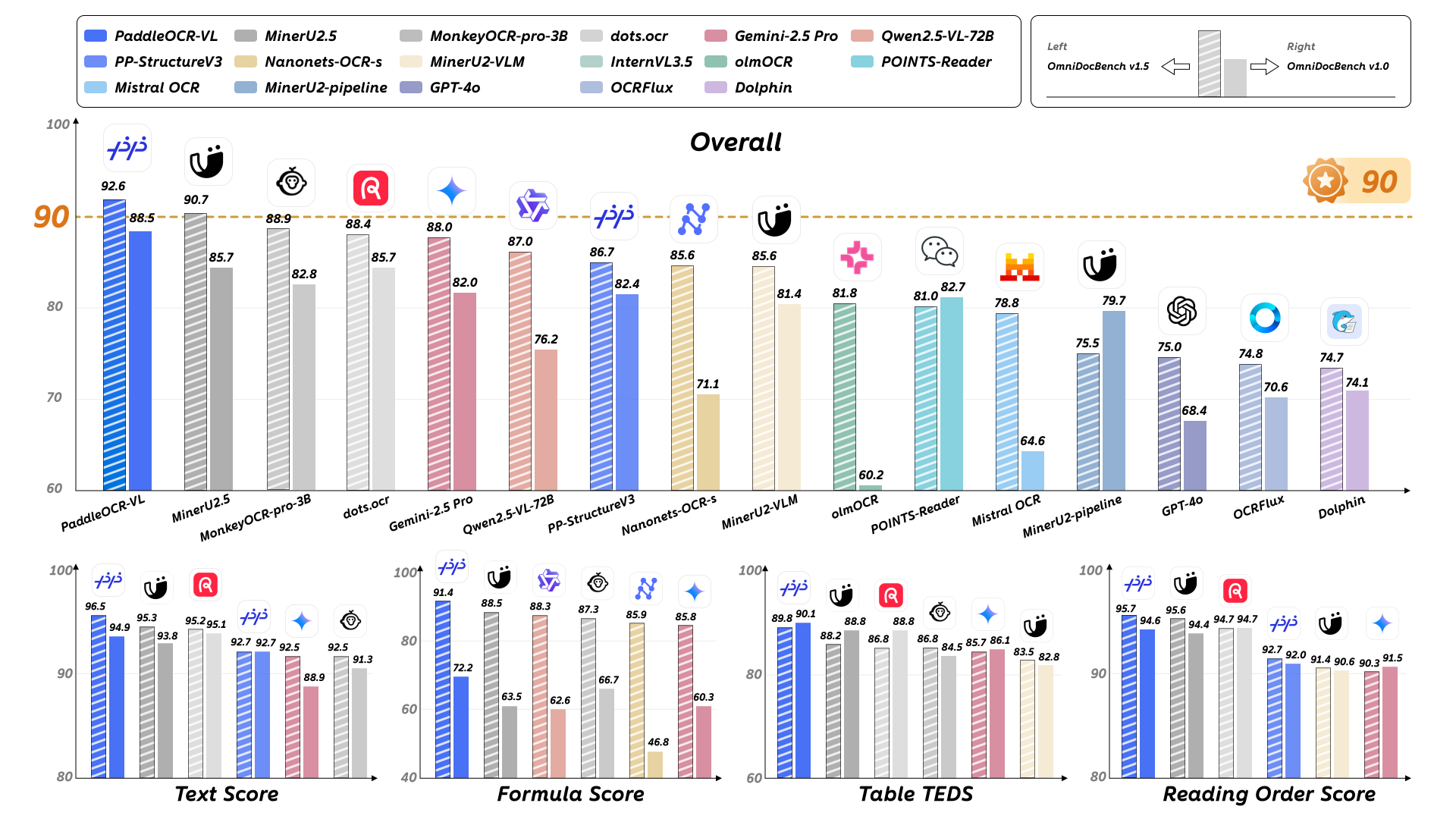
PaddleOCR-VL is a SOTA and resource-efficient model tailored for document parsing. Its core component is PaddleOCR-VL-0.9B, a compact yet powerful vision-language model (VLM) that integrates a NaViT-style dynamic resolution visual encoder with the ERNIE-4.5-0.3B language model to enable accurate element recognition. This innovative model efficiently supports 109 languages and excels in recognizing complex elements (e.g., text, tables, formulas, and charts), while maintaining minimal resource consumption. Through comprehensive evaluations on widely used public benchmarks and in-house benchmarks, PaddleOCR-VL achieves SOTA performance in both page-level document parsing and element-level recognition. It significantly outperforms existing solutions, exhibits strong competitiveness against top-tier VLMs, and delivers fast inference speeds. These strengths make it highly suitable for practical deployment in real-world scenarios.
1. Environment Preparation
We recommend using the official Docker image (requires Docker version >= 19.03, a machine equipped with a GPU, and NVIDIA drivers supporting CUDA 12.8):
docker run \
    -it \
    --gpus all \
    --network host \
    --user root \
    ccr-2vdh3abv-pub.cnc.bj.baidubce.com/paddlepaddle/paddleocr-vl:latest \
    /bin/bash
# Call PaddleOCR CLI or Python API inside the container
The image size is approximately 8 GB. If you want to use PaddleOCR-VL in an environment without internet access, replace ccr-2vdh3abv-pub.cnc.bj.baidubce.com/paddlepaddle/paddleocr-vl:latest in the above command with the offline version image
ccr-2vdh3abv-pub.cnc.bj.baidubce.com/paddlepaddle/paddleocr-vl:latest-offline (the offline image is about 11 GB). You’ll need to pull the image on a machine with internet access, import it to the offline machine, and then use it to start the container. For example:
# Execute on a machine with internet access
docker pull ccr-2vdh3abv-pub.cnc.bj.baidubce.com/paddlepaddle/paddleocr-vl:latest-offline
# Save the image to a file
docker save ccr-2vdh3abv-pub.cnc.bj.baidubce.com/paddlepaddle/paddleocr-vl:latest-offline -o paddleocr-vl-latest-offline.tar

# Transfer the image file to the offline machine

# Execute on the offline machine
docker load -i paddleocr-vl-latest-offline.tar
# After this, you can use `docker run` to start the container on the offline machine
If you cannot use Docker, you can also manually install PaddlePaddle and PaddleOCR. Python version 3.8–3.12 is required.
We strongly recommend installing PaddleOCR-VL in a virtual environment to avoid dependency conflicts. For example, use the Python venv standard library to create a virtual environment:
# Create a virtual environment
python -m venv .venv_paddleocr
# Activate the environment
source .venv_paddleocr/bin/activate
Execute the following commands to complete the installation:
# The following command installs PaddlePaddle for CUDA 12.6. For other CUDA versions and CPU-only version, please refer to: https://www.paddlepaddle.org.cn/install/quick?docurl=/documentation/docs/zh/develop/install/pip/linux-pip.html
python -m pip install paddlepaddle-gpu==3.2.0 -i https://www.paddlepaddle.org.cn/packages/stable/cu126/
python -m pip install -U "paddleocr[doc-parser]"
# For Linux systems, run:
python -m pip install https://paddle-whl.bj.bcebos.com/nightly/cu126/safetensors/safetensors-0.6.2.dev0-cp38-abi3-linux_x86_64.whl
Please make sure to install PaddlePaddle version 3.2.0 or above, and also install the special version of
safetensors. For Windows users, please use WSL or Docker to set up the environment; for macOS users, please use Docker for environment setup.
PaddleOCR-VL support for inference devices is as follows:
| Inference Method | Supports x64 CPU | Supported GPU Compute Capability | Supported CUDA Versions |
|---|---|---|---|
| PaddlePaddle | ✅ | ≥ 7 | 11.8, 12.6, 12.8 |
| vLLM | 🚧 | ≥ 8 (RTX 3060, RTX 5070, A10, A100, ...) 7 ≤ GPU Compute Capability < 8 (T4, V100, ...) can run but may experience issues like request timeouts, OOM, etc. Not recommended for use. |
12.8 |
| SGLang | 🚧 | 8 ≤ GPU Compute Capability < 12 | 12.8 |
Currently, PaddleOCR-VL does not support ARM architecture CPUs. Support for more hardware will be expanded based on actual requirements in the future. Stay tuned!
vLLM and SGLang cannot run natively on Windows or macOS. Please use the Docker image we provide.
2. Quick Start
PaddleOCR-VL supports two usage methods: CLI command line and Python API. The CLI command line method is simpler and suitable for quickly verifying functionality, while the Python API method is more flexible and suitable for integration into existing projects.
The methods introduced in this section are primarily for rapid validation. Their inference speed, memory usage, and stability may not meet the requirements of a production environment. If deployment to a production environment is needed, we strongly recommend using a dedicated inference acceleration framework. For specific methods, please refer to the next section.
2.1 Command Line Usage
Run a single command to quickly test the PaddleOCR-VL :
paddleocr doc_parser -i https://paddle-model-ecology.bj.bcebos.com/paddlex/imgs/demo_image/paddleocr_vl_demo.png

# Use --use_doc_orientation_classify to enable document orientation classification
paddleocr doc_parser -i ./paddleocr_vl_demo.png --use_doc_orientation_classify True

# Use --use_doc_unwarping to enable document unwarping module
paddleocr doc_parser -i ./paddleocr_vl_demo.png --use_doc_unwarping True

# Use --use_layout_detection to enable layout detection
paddleocr doc_parser -i ./paddleocr_vl_demo.png --use_layout_detection False
Command line supports more parameters. Click to expand for detailed parameter descriptions
| Parameter | Description | Type | |
|---|---|---|---|
input |
Data to be predicted, required.
For example, the local path of an image file or PDF file: /root/data/img.jpg;Such as a URL link, for example, the network URL of an image file or PDF file:Example;Such as a local directory, which should contain the images to be predicted, for example, the local path: /root/data/(Currently, prediction for directories containing PDF files is not supported. PDF files need to be specified with a specific file path). |
str |
|
save_path |
Specify the path where the inference result file will be saved. If not set, the inference results will not be saved locally. | str |
|
layout_detection_model_name |
Name of the layout area detection and ranking model. If not set, the default model of the production line will be used. | str |
|
layout_detection_model_dir |
Directory path of the layout area detection and ranking model. If not set, the official model will be downloaded. | str |
|
layout_threshold |
Score threshold for the layout model. Any value between 0-1. If not set, the default value is used, which is 0.5.
|
||
layout_nms |
Whether to use post-processing NMS for layout detection. If not set, the initialized default value will be used. | bool |
|
layout_unclip_ratio |
Expansion coefficient for the detection boxes of the layout area detection model.Any floating-point number greater than 0. If not set, the initialized default value will be used. |
float |
|
layout_merge_bboxes_mode |
Merging mode for the detection boxes output by the model in layout detection.
|
str |
|
vl_rec_model_name |
Name of the multimodal recognition model. If not set, the default model will be used. | str |
|
vl_rec_model_dir |
Directory path of the multimodal recognition model. If not set, the official model will be downloaded. | str |
|
vl_rec_backend |
Inference backend used by the multimodal recognition model. | str |
|
vl_rec_server_url |
If the multimodal recognition model uses an inference service, this parameter is used to specify the server URL. | str |
|
vl_rec_max_concurrency |
If the multimodal recognition model uses an inference service, this parameter is used to specify the maximum number of concurrent requests. | str |
|
doc_orientation_classify_model_name |
Name of the document orientation classification model. If not set, the initialized default value will be used. | str |
|
doc_orientation_classify_model_dir |
Directory path of the document orientation classification model. If not set, the official model will be downloaded. | str |
|
doc_unwarping_model_name |
Name of the text image rectification model. If not set, the initialized default value will be used. | str |
|
doc_unwarping_model_dir |
Directory path of the text image rectification model. If not set, the official model will be downloaded. | str |
|
use_doc_orientation_classify |
Whether to load and use the document orientation classification module. If not set, the initialized default value will be used, which is initialized toFalse. |
bool |
|
use_doc_unwarping |
Whether to load and use the text image rectification module. If not set, the initialized default value will be used, which is initialized to False. |
bool |
|
use_layout_detection |
Whether to load and use the layout area detection and ranking module. If not set, the initialized default value will be used, which is initialized to True. |
bool |
|
use_chart_recognition |
Whether to use the chart parsing function. If not set, the initialized default value will be used, which is initialized to False. |
bool |
|
format_block_content |
Controls whether to format the block_content content within as Markdown. If not set, the initialized default value will be used, which defaults to initialization asFalse. |
bool |
|
use_queues |
Used to control whether to enable internal queues. When set to True, data loading (such as rendering PDF pages as images), layout detection model processing, and VLM inference will be executed asynchronously in separate threads, with data passed through queues, thereby improving efficiency. This approach is particularly efficient for PDF documents with a large number of pages or directories containing a large number of images or PDF files. |
bool |
|
prompt_label |
The prompt type setting for the VL model, which takes effect if and only if use_layout_detection=False. |
str |
|
repetition_penalty |
The repetition penalty parameter used in VL model sampling. | float |
|
temperature |
The temperature parameter used in VL model sampling. | float |
|
top_p |
The top-p parameter used in VL model sampling. | float |
|
min_pixels |
The minimum number of pixels allowed when the VL model preprocesses images. | int |
|
max_pixels |
The maximum number of pixels allowed when the VL model preprocesses images. | int |
|
device |
The device used for inference. Supports specifying specific card numbers:
|
str |
|
enable_hpi |
Whether to enable high-performance inference. | bool |
|
use_tensorrt |
Whether to enable the TensorRT subgraph engine of Paddle Inference. If the model does not support acceleration via TensorRT, acceleration will not be used even if this flag is set. For PaddlePaddle version with CUDA 11.8, the compatible TensorRT version is 8.x (x>=6). It is recommended to install TensorRT 8.6.1.6. |
bool |
|
precision |
Computational precision, such as fp32, fp16. | str |
|
enable_mkldnn |
Whether to enable MKL-DNN accelerated inference. If MKL-DNN is not available or the model does not support acceleration via MKL-DNN, acceleration will not be used even if this flag is set. | bool |
|
mkldnn_cache_capacity |
MKL-DNN cache capacity. | int |
|
cpu_threads |
The number of threads used for inference on the CPU. | int |
|
paddlex_config |
The file path for PaddleX production line configuration. | str |
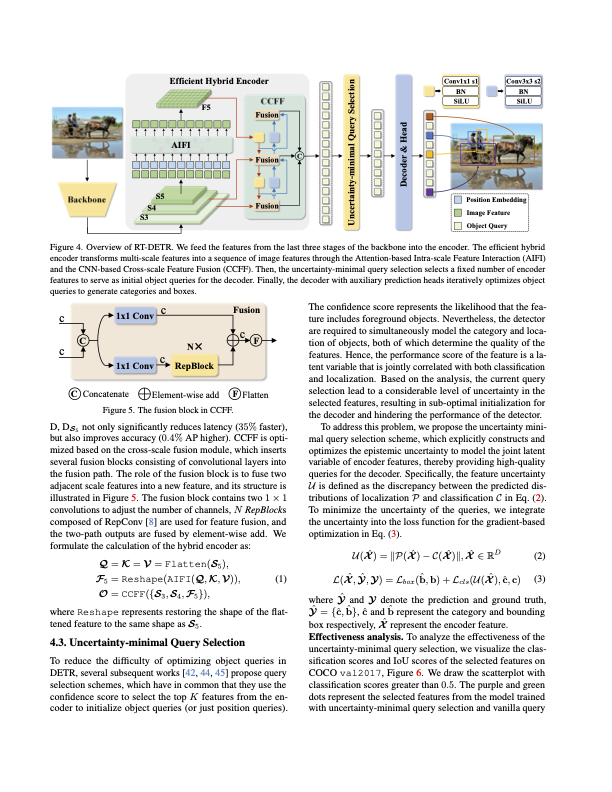
The inference result will be printed in the terminal. The default output of the PP-StructureV3 pipeline is as follows:
👉Click to expand
{'res': {'input_path': 'paddleocr_vl_demo.png', 'page_index': None, 'model_settings': {'use_doc_preprocessor': False, 'use_layout_detection': True, 'use_chart_recognition': False, 'format_block_content': False}, 'layout_det_res': {'input_path': None, 'page_index': None, 'boxes': [{'cls_id': 6, 'label': 'doc_title', 'score': 0.9636914134025574, 'coordinate': [np.float32(131.31366), np.float32(36.450516), np.float32(1384.522), np.float32(127.984665)]}, {'cls_id': 22, 'label': 'text', 'score': 0.9281806349754333, 'coordinate': [np.float32(585.39465), np.float32(158.438), np.float32(930.2184), np.float32(182.57469)]}, {'cls_id': 22, 'label': 'text', 'score': 0.9840355515480042, 'coordinate': [np.float32(9.023666), np.float32(200.86115), np.float32(361.41583), np.float32(343.8828)]}, {'cls_id': 14, 'label': 'image', 'score': 0.9871416091918945, 'coordinate': [np.float32(775.50574), np.float32(200.66502), np.float32(1503.3807), np.float32(684.9304)]}, {'cls_id': 22, 'label': 'text', 'score': 0.9801855087280273, 'coordinate': [np.float32(9.532196), np.float32(344.90594), np.float32(361.4413), np.float32(440.8244)]}, {'cls_id': 17, 'label': 'paragraph_title', 'score': 0.9708921313285828, 'coordinate': [np.float32(28.040405), np.float32(455.87976), np.float32(341.7215), np.float32(520.7117)]}, {'cls_id': 24, 'label': 'vision_footnote', 'score': 0.9002962708473206, 'coordinate': [np.float32(809.0692), np.float32(703.70044), np.float32(1488.3016), np.float32(750.5238)]}, {'cls_id': 22, 'label': 'text', 'score': 0.9825374484062195, 'coordinate': [np.float32(8.896561), np.float32(536.54895), np.float32(361.05237), np.float32(655.8058)]}, {'cls_id': 22, 'label': 'text', 'score': 0.9822263717651367, 'coordinate': [np.float32(8.971573), np.float32(657.4949), np.float32(362.01715), np.float32(774.625)]}, {'cls_id': 22, 'label': 'text', 'score': 0.9767460823059082, 'coordinate': [np.float32(9.407074), np.float32(776.5216), np.float32(361.31067), np.float32(846.82874)]}, {'cls_id': 22, 'label': 'text', 'score': 0.9868153929710388, 'coordinate': [np.float32(8.669495), np.float32(848.2543), np.float32(361.64703), np.float32(1062.8568)]}, {'cls_id': 22, 'label': 'text', 'score': 0.9826608300209045, 'coordinate': [np.float32(8.8025055), np.float32(1063.8615), np.float32(361.46588), np.float32(1182.8524)]}, {'cls_id': 22, 'label': 'text', 'score': 0.982555627822876, 'coordinate': [np.float32(8.820602), np.float32(1184.4663), np.float32(361.66394), np.float32(1302.4507)]}, {'cls_id': 22, 'label': 'text', 'score': 0.9584776759147644, 'coordinate': [np.float32(9.170288), np.float32(1304.2161), np.float32(361.48898), np.float32(1351.7483)]}, {'cls_id': 22, 'label': 'text', 'score': 0.9782056212425232, 'coordinate': [np.float32(389.1618), np.float32(200.38202), np.float32(742.7591), np.float32(295.65146)]}, {'cls_id': 22, 'label': 'text', 'score': 0.9844875931739807, 'coordinate': [np.float32(388.73303), np.float32(297.18463), np.float32(744.00024), np.float32(441.3034)]}, {'cls_id': 17, 'label': 'paragraph_title', 'score': 0.9680547714233398, 'coordinate': [np.float32(409.39468), np.float32(455.89386), np.float32(721.7174), np.float32(520.9387)]}, {'cls_id': 22, 'label': 'text', 'score': 0.9741666913032532, 'coordinate': [np.float32(389.71606), np.float32(536.8138), np.float32(742.7112), np.float32(608.00165)]}, {'cls_id': 22, 'label': 'text', 'score': 0.9840384721755981, 'coordinate': [np.float32(389.30988), np.float32(609.39636), np.float32(743.09247), np.float32(750.3231)]}, {'cls_id': 22, 'label': 'text', 'score': 0.9845995306968689, 'coordinate': [np.float32(389.13272), np.float32(751.7772), np.float32(743.058), np.float32(894.8815)]}, {'cls_id': 22, 'label': 'text', 'score': 0.984852135181427, 'coordinate': [np.float32(388.83267), np.float32(896.0371), np.float32(743.58215), np.float32(1038.7345)]}, {'cls_id': 22, 'label': 'text', 'score': 0.9804865717887878, 'coordinate': [np.float32(389.08478), np.float32(1039.9119), np.float32(742.7585), np.float32(1134.4897)]}, {'cls_id': 22, 'label': 'text', 'score': 0.986461341381073, 'coordinate': [np.float32(388.52643), np.float32(1135.8137), np.float32(743.451), np.float32(1352.0085)]}, {'cls_id': 22, 'label': 'text', 'score': 0.9869391918182373, 'coordinate': [np.float32(769.8341), np.float32(775.66235), np.float32(1124.9813), np.float32(1063.207)]}, {'cls_id': 22, 'label': 'text', 'score': 0.9822869896888733, 'coordinate': [np.float32(770.30383), np.float32(1063.938), np.float32(1124.8295), np.float32(1184.2192)]}, {'cls_id': 17, 'label': 'paragraph_title', 'score': 0.9689218997955322, 'coordinate': [np.float32(791.3042), np.float32(1199.3169), np.float32(1104.4521), np.float32(1264.6985)]}, {'cls_id': 22, 'label': 'text', 'score': 0.9713128209114075, 'coordinate': [np.float32(770.4253), np.float32(1279.6072), np.float32(1124.6917), np.float32(1351.8672)]}, {'cls_id': 22, 'label': 'text', 'score': 0.9236552119255066, 'coordinate': [np.float32(1153.9058), np.float32(775.5814), np.float32(1334.0654), np.float32(798.1581)]}, {'cls_id': 22, 'label': 'text', 'score': 0.9857938885688782, 'coordinate': [np.float32(1151.5197), np.float32(799.28015), np.float32(1506.3619), np.float32(991.1156)]}, {'cls_id': 22, 'label': 'text', 'score': 0.9820687174797058, 'coordinate': [np.float32(1151.5686), np.float32(991.91095), np.float32(1506.6023), np.float32(1110.8875)]}, {'cls_id': 22, 'label': 'text', 'score': 0.9866049885749817, 'coordinate': [np.float32(1151.6919), np.float32(1112.1301), np.float32(1507.1611), np.float32(1351.9504)]}]}}}
For explanation of the result parameters, refer to 2.2 Python Script Integration.
Note: The default model for the production line is relatively large, which may result in slower inference speed. It is recommended to use inference acceleration frameworks to enhance VLM inference performance for faster inference.
2.2 Python Script Integration
The command line method is for quick testing and visualization. In actual projects, you usually need to integrate the model via code. You can perform pipeline inference with just a few lines of code as shown below:
from paddleocr import PaddleOCRVL

pipeline = PaddleOCRVL()
# pipeline = PaddleOCRVL(use_doc_orientation_classify=True) # Use use_doc_orientation_classify to enable/disable document orientation classification model
# pipeline = PaddleOCRVL(use_doc_unwarping=True) # Use use_doc_unwarping to enable/disable document unwarping module
# pipeline = PaddleOCRVL(use_layout_detection=False) # Use use_layout_detection to enable/disable layout detection module
output = pipeline.predict("./paddleocr_vl_demo.png")
for res in output:
    res.print() ## Print the structured prediction output
    res.save_to_json(save_path="output") ## Save the current image's structured result in JSON format
    res.save_to_markdown(save_path="output") ## Save the current image's result in Markdown format
For PDF files, each page will be processed individually and generate a separate Markdown file. If you want to convert the entire PDF to a single Markdown file, use the following method:
from pathlib import Path
from paddleocr import PaddleOCRVL

input_file = "./your_pdf_file.pdf"
output_path = Path("./output")

pipeline = PaddleOCRVL()
output = pipeline.predict(input=input_file)

markdown_list = []
markdown_images = []

for res in output:
    md_info = res.markdown
    markdown_list.append(md_info)
    markdown_images.append(md_info.get("markdown_images", {}))

markdown_texts = pipeline.concatenate_markdown_pages(markdown_list)

mkd_file_path = output_path / f"{Path(input_file).stem}.md"
mkd_file_path.parent.mkdir(parents=True, exist_ok=True)

with open(mkd_file_path, "w", encoding="utf-8") as f:
    f.write(markdown_texts)

for item in markdown_images:
    if item:
        for path, image in item.items():
            file_path = output_path / path
            file_path.parent.mkdir(parents=True, exist_ok=True)
            image.save(file_path)
Note:
- In the example code, the parameters
use_doc_orientation_classifyanduse_doc_unwarpingare all set toFalseby default. These indicate that document orientation classification and document image unwarping are disabled. You can manually set them toTrueif needed.
The above Python script performs the following steps:
(1) Instantiate the production line object. Specific parameter descriptions are as follows:
| Parameter | Parameter Description | Parameter Type | Default Value | |
|---|---|---|---|---|
layout_detection_model_name |
Name of the layout area detection and ranking model. If set to None, the default model of the production line will be used. |
str|None |
None |
|
layout_detection_model_dir |
Directory path of the layout area detection and ranking model. If set to None, the official model will be downloaded. |
str|None |
None |
|
layout_threshold |
Score threshold for the layout model.
| float|dict|None |
None |
|
layout_nms |
Whether to use post-processing NMS for layout detection. If set to None, the parameter value initialized by the production line will be used. |
bool|None |
None |
|
layout_unclip_ratio |
Expansion coefficient for the detection box of the layout area detection model.
| float|Tuple[float,float]|dict|None |
None |
|
layout_merge_bboxes_mode
Merging mode for the detection boxes output by the model in layout detection.
|
str|dict|NoneNone | |||
vl_rec_model_name |
Name of the multimodal recognition model. If not set, the default model will be used. | str|None |
None |
|
vl_rec_model_dir |
Directory path of the multimodal recognition model. If not set, the official model will be downloaded. | str|None |
None |
|
vl_rec_backend |
Inference backend used by the multimodal recognition model. | str|None |
None |
|
vl_rec_server_url |
If the multimodal recognition model uses an inference service, this parameter is used to specify the server URL. | str|None |
None |
|
vl_rec_max_concurrency |
If the multimodal recognition model uses an inference service, this parameter is used to specify the maximum number of concurrent requests. | str|None |
None |
|
doc_orientation_classify_model_name |
Name of the document orientation classification model. If not set, the initialized default value will be used. | str|None |
None |
|
doc_orientation_classify_model_dir |
Directory path of the document orientation classification model. If not set, the official model will be downloaded. | str|None |
None |
|
doc_unwarping_model_name |
Name of the text image rectification model. If not set, the initialized default value will be used. | str|None |
None |
|
doc_unwarping_model_dir |
Directory path of the text image rectification model. If not set, the official model will be downloaded. | str|None |
None |
|
use_doc_orientation_classify |
Whether to load and use the document orientation classification module. If not set, the initialized default value will be used, which is initialized toFalse. |
bool|None |
None |
|
use_doc_unwarping |
Whether to load and use the text image rectification module. If not set, the initialized default value will be used, which is initialized to False. |
bool|None |
None |
|
use_layout_detection |
Whether to load and use the layout area detection and ranking module. If not set, the initialized default value will be used, which is initialized to True. |
bool|None |
None |
|
use_chart_recognition |
Whether to use the chart parsing function. If not set, the initialized default value will be used, which is initialized to False. |
bool|None |
None |
|
format_block_content |
Controls whether to format the block_content content within as Markdown. If not set, the initialized default value will be used, which defaults to initialization asFalse. |
bool|None |
None |
|
device |
The device used for inference. Supports specifying specific card numbers:
|
str|None |
None |
|
enable_hpi |
Whether to enable high-performance inference. | bool |
False |
|
use_tensorrt |
Whether to enable the TensorRT subgraph engine of Paddle Inference. If the model does not support acceleration via TensorRT, acceleration will not be used even if this flag is set. For PaddlePaddle version with CUDA 11.8, the compatible TensorRT version is 8.x (x>=6). It is recommended to install TensorRT 8.6.1.6. |
bool |
False |
|
precision |
Computational precision, such as fp32, fp16. | str |
"fp32" |
|
enable_mkldnn |
Whether to enable MKL-DNN accelerated inference. If MKL-DNN is not available or the model does not support acceleration via MKL-DNN, acceleration will not be used even if this flag is set. | bool |
True |
|
mkldnn_cache_capacity |
MKL-DNN cache capacity. | int |
10 |
|
cpu_threads |
The number of threads used for inference on the CPU. | int |
8 |
|
paddlex_config |
The file path for PaddleX production line configuration. | str |
None |
(2) Call the predict()method of the PaddleOCR-VL production line object for inference prediction. This method will return a list of results. Additionally, the production line also provides the predict_iter()Method. The two are completely consistent in terms of parameter acceptance and result return. The difference lies in that predict_iter()returns a generator, which can process and obtain prediction results step by step. It is suitable for scenarios involving large datasets or where memory conservation is desired. You can choose either of these two methods based on actual needs. Below are the parameters of the predict()method and their descriptions:
| Parameter | Parameter Description | Parameter Type | Default Value |
|---|---|---|---|
input |
Data to be predicted, supporting multiple input types. Required.
|
Python Var|str|list |
|
use_doc_orientation_classify |
Whether to use the document orientation classification module during inference. Setting it to None means using the instantiation parameter; otherwise, this parameter takes precedence. |
bool|None |
None |
use_doc_unwarping |
Whether to use the text image rectification module during inference. Setting it to None means using the instantiation parameter; otherwise, this parameter takes precedence. |
bool|None |
None |
use_layout_detection |
Whether to use the layout region detection and sorting module during inference. Setting it to None means using the instantiation parameter; otherwise, this parameter takes precedence. |
bool|None |
None |
use_chart_recognition |
Whether to use the chart parsing module during inference. Setting it to None means using the instantiation parameter; otherwise, this parameter takes precedence. |
bool|None |
None |
layout_threshold |
The parameter meaning is basically the same as the instantiation parameter. Setting it to None means using the instantiation parameter; otherwise, this parameter takes precedence. |
float|dict|None |
None |
layout_nms |
The parameter meaning is basically the same as the instantiation parameter. Setting it to None means using the instantiation parameter; otherwise, this parameter takes precedence. |
bool|None |
None |
layout_unclip_ratio |
The parameter meaning is basically the same as the instantiation parameter. Setting it to None means using the instantiation parameter; otherwise, this parameter takes precedence. |
float|Tuple[float,float]|dict|None |
None |
layout_merge_bboxes_mode |
The parameter meaning is basically the same as the instantiation parameter. Setting it to None means using the instantiation parameter; otherwise, this parameter takes precedence. |
str|dict|None |
None |
use_queues |
Used to control whether to enable internal queues. When set to True, data loading (such as rendering PDF pages as images), layout detection model processing, and VLM inference will be executed asynchronously in separate threads, with data passed through queues, thereby improving efficiency. This approach is particularly efficient for PDF documents with many pages or directories containing a large number of images or PDF files. |
bool|None |
None |
prompt_label |
The prompt type setting for the VL model, which takes effect only when use_layout_detection=False. |
str|None |
None |
format_block_content |
The parameter meaning is basically the same as the instantiation parameter. Setting it to None means using the instantiation parameter; otherwise, this parameter takes precedence. |
bool|None |
None |
repetition_penalty |
The repetition penalty parameter used for VL model sampling. | float|None |
None |
temperature |
Temperature parameter used for VL model sampling. | float|None |
None |
top_p |
Top-p parameter used for VL model sampling. | float|None |
None |
min_pixels |
The minimum number of pixels allowed when the VL model preprocesses images. | int|None |
None |
max_pixels |
The maximum number of pixels allowed when the VL model preprocesses images. | int|None |
None |
(3) Process the prediction results: The prediction result for each sample is a corresponding Result object, supporting operations such as printing, saving as an image, and saving as a json file:
| Method | Method Description | Parameter | Parameter Type | Parameter Description | Default Value |
|---|---|---|---|---|---|
print() |
Print results to the terminal | format_json |
bool |
Whether to format the output content using JSON indentation. |
True |
indent |
int |
Specify the indentation level to beautify the output JSON data, making it more readable. Only valid when format_json is True. |
4 |
||
ensure_ascii |
bool |
Control whether non- ASCII characters are escaped as Unicode. When set to True, all non- ASCII characters will be escaped; False retains the original characters. Only valid when format_json is True. |
False |
||
save_to_json() |
Save the results as a json format file | save_path |
str |
The file path for saving. When it is a directory, the saved file name will be consistent with the input file type naming. | None |
indent |
int |
Specify the indentation level to beautify the output JSONdata, making it more readable. Only valid when format_jsonis True. |
4 |
||
ensure_ascii |
bool |
Control whether non- ASCII characters are escaped as Unicode. When set to True, all non- ASCII characters will be escaped; False retains the original characters. Only valid when format_json is True. |
False |
||
save_to_img() |
Save the visualized images of each intermediate module in png format | save_path |
str |
The file path for saving, supporting directory or file paths. | None |
save_to_markdown() |
Save each page in an image or PDF file as a markdown format file separately | save_path |
str |
The file path for saving. When it is a directory, the saved file name will be consistent with the input file type naming | None |
pretty |
bool |
Whether to beautify the markdown output results, centering charts, etc., to make the markdown rendering more aesthetically pleasing. |
True |
||
show_formula_number |
bool |
Control whether to retain formula numbers in markdown. When set to True, all formula numbers are retained; False retains only the formulas |
False |
||
save_to_html() |
Save the tables in the file as html format files | save_path |
str |
The file path for saving, supporting directory or file paths. | None |
save_to_xlsx() |
Save the tables in the file as xlsx format files | save_path |
str |
The file path for saving, supporting directory or file paths. | None |
| Attribute | Attribute Description |
|---|---|
json |
Obtain the prediction jsonresult in the format |
img |
obtain in the format of dictvisualized image |
markdown |
obtain in the format of dictmarkdown result |
3. Enhancing VLM Inference Performance Using Inference Acceleration Frameworks
The inference performance under the default configuration has not been fully optimized and may not meet actual production requirements. PaddleOCR supports enhancing the inference performance of VLM through inference acceleration frameworks such as vLLM and SGLang, thereby accelerating the inference speed in production lines. The usage process mainly consists of two steps:
- Start the VLM inference service;
- Configure the PaddleOCR production line to invoke the VLM inference service as a client.
3.1 Starting the VLM Inference Service
3.1.1 Using Docker Images
PaddleOCR provides Docker images for quickly launching vLLM inference services. You can use the following command to start the service (requires Docker version >= 19.03, a machine equipped with a GPU, and NVIDIA drivers supporting CUDA 12.8):
docker run \
    -it \
    --rm \
    --gpus all \
    --network host \
    ccr-2vdh3abv-pub.cnc.bj.baidubce.com/paddlepaddle/paddleocr-genai-vllm-server:latest
The image size is approximately 13 GB. The server listens on port 8080 by default.
If you wish to start the service in an environment without internet access, replace ccr-2vdh3abv-pub.cnc.bj.baidubce.com/paddlepaddle/paddleocr-genai-vllm-server:latest in the above command with the offline version image ccr-2vdh3abv-pub.cnc.bj.baidubce.com/paddlepaddle/paddleocr-genai-vllm-server:latest-offline. The offline image size is approximately 15 GB.
You can pass parameters when starting the container to override the default configurations. For supported parameters, please refer to the next subsection. For example:
docker run \
    -it \
    --rm \
    --gpus all \
    --network host \
    ccr-2vdh3abv-pub.cnc.bj.baidubce.com/paddlepaddle/paddleocr-genai-vllm-server:latest \
    paddleocr genai_server --model_name PaddleOCR-VL-0.9B --host 0.0.0.0 --port 8118 --backend vllm
If you are using an NVIDIA 50-series graphics card (Compute Capability >= 12), you need to install a specific version of FlashAttention before starting the service:
docker run \
    -it \
    --rm \
    --gpus all \
    --network host \
    ccr-2vdh3abv-pub.cnc.bj.baidubce.com/paddlepaddle/paddleocr-genai-vllm-server:latest \
    /bin/bash
# After entering the container
python -m pip install https://github.com/mjun0812/flash-attention-prebuild-wheels/releases/download/v0.4.11/flash_attn-2.8.3+cu128torch2.8-cp310-cp310-linux_x86_64.whl
paddleocr genai_server --model_name PaddleOCR-VL-0.9B --backend vllm --port 8118
If you are using an NVIDIA 50 series graphics card (Compute Capacity >= 12), you need to install a specific version of FlashAttention before launching the service.
docker run \
    -it \
    --rm \
    --gpus all \
    --network host \
    ccr-2vdh3abv-pub.cnc.bj.baidubce.com/paddlepaddle/paddlex-genai-vllm-server \
    /bin/bash
python -m pip install flash-attn==2.8.3
paddlex_genai_server --model_name PaddleOCR-VL-0.9B --backend vllm --port 8118
3.1.2 Installation and Usage via PaddleOCR CLI
Since the inference acceleration framework may have dependency conflicts with the PaddlePaddle framework, it is recommended to install it in a virtual environment. Taking vLLM as an example:
# If there is currently an activated virtual environment, first deactivate it using `deactivate`
# Create a virtual environment
python -m venv .venv_vlm
# Activate the environment
source .venv_vlm/bin/activate
# Install PaddleOCR
python -m pip install "paddleocr[doc-parser]"
# Install dependencies for inference acceleration service
paddleocr install_genai_server_deps vllm
Usage of the paddleocr install_genai_server_deps command:
The currently supported frameworks are named vllm and sglang, corresponding to vLLM and SGLang, respectively.
If you are using an NVIDIA 50 series graphics card (Compute Capability >= 12), you need to install a specific version of FlashAttention before launching the service.
The vLLM and SGLang installed via paddleocr install_genai_server_deps are both CUDA 12 versions. Please ensure your local GPU drivers are compatible with this requirement.
During the execution of the
paddleocr install_genai_server_depscommand, CUDA compilation tools such as nvcc may be required. If these tools are not available in your environment (for example, when using thepaddleocr-vlimage), you can obtain precompiled versions of FlashAttention from this repository (install version 2.8.3 for NVIDIA 50-series GPUs, and version 2.8.2 for other GPU models). Install the precompiled package first, and then proceed with the subsequent command. For example, if you are using a non-50-series GPU, execute the following command in thepaddleocr-vlimage:python -m pip install https://github.com/mjun0812/flash-attention-prebuild-wheels/releases/download/v0.3.14/flash_attn-2.8.2+cu128torch2.8-cp310-cp310-linux_x86_64.whl.
After installation, you can start the service using the paddlex_genai_server command:
The parameters supported by this command are as follows:
| Parameter | Description |
|---|---|
--model_name |
Model name |
--model_dir |
Model directory |
--host |
Server hostname |
--port |
Server port number |
--backend |
Backend name, i.e., the name of the inference acceleration framework used. Options are vllm or sglang. |
--backend_config |
A YAML file can be specified, which contains backend configurations. |
3.2 How to Use the Client
After starting the VLM inference service, the client can invoke the service through PaddleOCR.
3.2.1 CLI Invocation
The backend type (vllm-server or sglang-server) can be specified via --vl_rec_backend, and the service address can be specified via --vl_rec_server_url. For example:
paddleocr doc_parser --input paddleocr_vl_demo.png --vl_rec_backend vllm-server --vl_rec_server_url http://127.0.0.1:8118/v1
3.2.2 Python API Invocation
Pass the vl_rec_backend and vl_rec_server_url parameters when creating the PaddleOCRVL object:
3.3 Performance Tuning
The default configuration is tuned on a single NVIDIA A100 and assumes exclusive client service, so it may not be suitable for other environments. If users encounter performance issues during actual use, they can try the following optimization methods.
3.3.1 Server-side Parameter Adjustment
Different inference acceleration frameworks support different parameters. Refer to their respective official documentation to learn about available parameters and when to adjust them:
The PaddleOCR VLM inference service supports parameter tuning through configuration files. The following example demonstrates how to adjust the gpu-memory-utilization and max-num-seqs parameters of the vLLM server:
- Create a YAML file named
vllm_config.yamlwith the following content:
gpu-memory-utilization: 0.3
   max-num-seqs: 128


2. Specify the configuration file path when starting the service, for example, using the `paddleocr genai_server` command:

```shell
paddleocr genai_server --model_name PaddleOCR-VL-0.9B --backend vllm --backend_config vllm_config.yaml


If you are using a shell that supports process substitution (such as Bash), you can also pass configuration items directly when starting the service without creating a configuration file:

```bash
paddleocr genai_server --model_name PaddleOCR-VL-0.9B --backend vllm --backend_config <(echo -e 'gpu-memory-utilization: 0.3\nmax-num-seqs: 128')
3.3.2 Client-Side Parameter Adjustment
PaddleOCR groups sub-images from single or multiple input images and initiates concurrent requests to the server. Therefore, the number of concurrent requests significantly impacts performance.
- For the CLI and Python API, the maximum number of concurrent requests can be adjusted using the
vl_rec_max_concurrencyparameter. - For service-based deployment, modify the
VLRecognition.genai_config.max_concurrencyfield in the configuration file.
When there is a one-to-one correspondence between the client and the VLM inference service, and the server-side resources are sufficient, the number of concurrent requests can be appropriately increased to enhance performance. If the server needs to support multiple clients or has limited computational resources, the number of concurrent requests should be reduced to prevent service abnormalities caused by resource overload.
3.3.3 Recommendations for Performance Tuning on Common Hardware
The following configurations are tailored for scenarios with a one-to-one correspondence between the client and the VLM inference service.
NVIDIA RTX 3060
- Server-Side
- vLLM:
gpu-memory-utilization=0.8
4. Serving
If you wish to directly integrate PaddleOCR-VL into your Python project, you can refer to the sample code provided in 2.2 Python Script Method.
Furthermore, PaddleOCR also supports deploying PaddleOCR-VL as a service. This section will detail the serving steps. Please note that the pipeline service introduced in this section differs from the VLM inference service in the previous section: the latter is only responsible for one step (i.e., VLM inference) in the complete workflow and is called as an underlying service by the former.
4.1 Running the Server
4.1.1 Using Docker Compose
You can obtain the Compose file from here. After downloading it locally, execute the following command to start the server:
After startup, you will see output similar to the following:
paddleocr-vl-api             | INFO:     Started server process [1]
paddleocr-vl-api             | INFO:     Waiting for application startup.
paddleocr-vl-api             | INFO:     Application startup complete.
paddleocr-vl-api             | INFO:     Uvicorn running on http://0.0.0.0:8080 (Press CTRL+C to quit)
The server listens on port 8080 by default.
This method accelerates VLM inference based on the vLLM framework, making it more suitable for production environment deployment. However, it requires the machine to be equipped with a GPU and the NVIDIA drivers to support CUDA 12.8. The default Docker images are not compatible with NVIDIA 50-series graphics cards. If you wish to use these graphics cards, please refer to Section 3 for instructions on installing a specific version of FlashAttention in the ccr-2vdh3abv-pub.cnc.bj.baidubce.com/paddlepaddle/paddleocr-genai-vllm-server image.
Additionally, after starting the server using this method, no internet connection is required except for pulling the images. For deployment in an offline environment, you can first pull the images involved in the Compose file on a networked machine, export them, transfer them to the offline machine, and import them. The service can then be started in the offline environment.
If you need to adjust pipeline configurations (such as model path, batch size, deployment device, etc.), you can overwrite the modified pipeline configuration file to /home/paddleocr/pipeline_config.yaml in the ccr-2vdh3abv-pub.cnc.bj.baidubce.com/paddlepaddle/paddleocr-vl image (or the corresponding container). For the correspondence between PaddleOCR pipelines and PaddleX pipeline registration names, as well as how to obtain and modify PaddleX pipeline configuration files, please refer to PaddleOCR and PaddleX. Furthermore, section 4.1.3 will introduce how to adjust the pipeline configuration based on common requirements.
4.1.2 Local Installation and Startup
Execute the following command to install the serving plugin via the PaddleX CLI:
Then, use the PaddleX CLI to start the server:
After startup, you will see output similar to the following:
INFO:     Started server process [63108]
INFO:     Waiting for application startup.
INFO:     Application startup complete.
INFO:     Uvicorn running on http://0.0.0.0:8080 (Press CTRL+C to quit)
The server listens on port 8080 by default.
The command-line options related to serving are as follows:
| Name | Description |
|---|---|
--pipeline |
PaddleX pipeline registration name or pipeline configuration file path. |
--device |
Deployment device for the pipeline. By default, a GPU will be used if available; otherwise, a CPU will be used." |
--host |
Hostname or IP address to which the server is bound. Defaults to 0.0.0.0. |
--port |
Port number on which the server listens. Defaults to 8080. |
--use_hpip |
If specified, uses high-performance inference. Refer to the High-Performance Inference documentation for more information. |
--hpi_config |
High-performance inference configuration. Refer to the High-Performance Inference documentation for more information. |
If you need to adjust pipeline configurations (such as model path, batch size, deployment device, etc.), you can specify the --pipeline parameter as a custom configuration file path. For the correspondence between PaddleOCR pipelines and PaddleX pipeline registration names, as well as how to obtain and modify PaddleX pipeline configuration files, please refer to PaddleOCR and PaddleX. Furthermore, section 4.1.3 will introduce how to adjust the pipeline configuration based on common requirements.
4.1.3 Pipeline Configuration Adjustment Instructions
Using Acceleration Frameworks to Improve VLM Inference Performance
To use acceleration frameworks like vLLM to improve VLM inference performance, you can modify the VLRecognition.genai_config.backend and VLRecognition.genai_config.server_url fields in the pipeline configuration file, for example:
Section 2 has already detailed how to start the VLM inference service.
Enabling Document Image Preprocessing Functionality
The service started with the default configuration does not support the document preprocessing function. If a client calls this function, an error message will be returned. To enable document preprocessing, set use_doc_preprocessor to True in the pipeline configuration file and start the service using the modified configuration file.
Disabling Result Visualization Functionality
The service returns visualized results by default, which introduces additional overhead. To disable this functionality, add the following configuration to the pipeline configuration file:
Alternatively, you can set the visualize field to false in the request body to disable visualization for a single request.
Configuring Returned Image URLs
For the visualized result images and images contained within Markdown, the service returns them as Base64 encoded strings by default. To return images as URLs instead, add the following configuration to the pipeline configuration file:
Serving:
  extra:
    file_storage:
      type: bos
      endpoint: https://bj.bcebos.com
      bucket_name: some-bucket
      ak: xxx
      sk: xxx
      key_prefix: deploy
    return_img_urls: True
Currently, it supports storing the generated images to Baidu Object Storage (BOS) and returning URLs. The relevant parameters are explained below:
endpoint: Access domain name. Must be configured.ak: Baidu AI Cloud AK. Must be configured.sk: Baidu AI Cloud SK. Must be configured.bucket_name: Bucket name. Must be configured.key_prefix: Uniform prefix for object keys.connection_timeout_in_mills: Request timeout period (in milliseconds).
For more information, such as how to obtain AK/SK, please refer to the Baidu Intelligent Cloud Official Documentation.
Modifying PDF Parsing Page Limit
For performance considerations, the service only processes the first 10 pages of received PDF files by default. To adjust the page limit, add the following configuration to the pipeline configuration file:
Setting max_num_input_imgs to null removes the page limit.
4.3 Client-Side Invocation
Below are the API reference and examples of multi-language service invocation:
API Reference
Main operations provided by the service:
- The HTTP request method is POST.
- Both the request body and response body are JSON data (JSON objects).
- When the request is processed successfully, the response status code is
200, and the properties of the response body are as follows:
| Name | Type | Meaning |
|---|---|---|
logId |
string |
The UUID of the request. |
errorCode |
integer |
Error code. Fixed as 0. |
errorMsg |
string |
Error description. Fixed as "Success". |
result |
object |
Operation result. |
- When the request is not processed successfully, the properties of the response body are as follows:
| Name | Type | Meaning |
|---|---|---|
logId |
string |
The UUID of the request. |
errorCode |
integer |
Error code. Same as the response status code. |
errorMsg |
string |
Error description. |
The main operations provided by the service are as follows:
infer
Perform layout parsing.
POST /layout-parsing
- The properties of the request body are as follows:
| Name | Type | Meaning | Required |
|---|---|---|---|
file |
string |
The URL of an image file or PDF file accessible to the server, or the Base64-encoded result of the content of the aforementioned file types. By default, for PDF files with more than 10 pages, only the first 10 pages will be processed. To remove the page limit, add the following configuration to the production line configuration file:
|
Yes |
fileType |
integer|null |
File type.0 represents a PDF file,1 represents an image file. If this property is not present in the request body, the file type will be inferred from the URL. |
No |
useDocUnwarping |
boolean|null |
Please refer to the description of the use_doc_unwarping parameter in the predict method of the PaddleOCR-VL object. |
No |
useLayoutDetection |
boolean|null |
Please refer to the description of the use_layout_detection parameter in the predict method of the PaddleOCR-VL object. |
No |
useChartRecognition |
boolean|null |
Please refer to the description of the use_chart_recognition parameter in the predict method of the PaddleOCR-VL object. |
No |
layoutThreshold |
number|object|null |
Please refer to the description of the layout_threshold parameter in the predict method of the PaddleOCR-VL object. |
No |
layoutNms |
boolean|null |
Please refer to the description of the layout_nms parameter in the predict method of the PaddleOCR-VL object. |
No |
layoutUnclipRatio |
number|array|object|null |
Please refer to the description of the layout_unclip_ratio parameter in the predict method of the PaddleOCR-VL object. |
No |
layoutMergeBboxesMode |
string|object|null |
Please refer to the description of the layout_merge_bboxes_mode parameter in the predict method of the PaddleOCR-VL object. |
No |
promptLabel |
string|object|null |
Please refer to the description of the prompt_label parameter in the predict method of the PaddleOCR-VL object. |
No |
formatBlockContent |
boolean|null |
Please refer to the description of the format_block_content parameter in the predict method of the PaddleOCR-VL object. |
No |
repetitionPenalty |
number|null |
Please refer to the description of the repetition_penalty parameter in the predict method of the PaddleOCR-VL object. |
No |
temperature |
number|null |
Please refer to the description of the temperature parameter in the predict method of the PaddleOCR-VL object. |
No |
topP |
number|null |
Please refer to the description of the top_p parameter in the predict method of the PaddleOCR-VL object. |
No |
minPixels |
number|null |
Please refer to the description of the min_pixels parameter in the predict method of the PaddleOCR-VL object. |
No |
maxPixels |
number|null |
Please refer to the description of the max_pixels parameter in the predict method of the PaddleOCR-VL object. |
No |
prettifyMarkdown |
boolean |
Whether to output beautified Markdown text. The default is true. |
No |
showFormulaNumber |
boolean |
Whether to include formula numbers in the output Markdown text. The default is false. |
No |
visualize |
boolean|null |
Whether to return visualization result images and intermediate images during the processing.
For example, add the following field in the configuration file: visualize parameter in the request body. If this parameter is not set in either the request body or the configuration file (or null is passed in the request body and the configuration file is not set), images will be returned by default. |
No |
- When the request is processed successfully, the
resultin the response body has the following attributes:
| Name | Type | Meaning |
|---|---|---|
layoutParsingResults |
array |
Layout parsing results. The array length is 1 (for image input) or the actual number of document pages processed (for PDF input). For PDF input, each element in the array represents the result of each actual page processed in the PDF file. |
dataInfo |
object |
Input data information. |
Each element inlayoutParsingResults is an object with the following attributes:
| Meaning | Name | Type |
|---|---|---|
prunedResult |
object |
A simplified version of the res field in the JSON representation of the results generated by the predict method of the object, with the input_path and page_index fields removed. |
markdown |
object |
Markdown results. |
outputImages |
object|null |
Refer to the img property description of the prediction results. The image is in JPEG format and encoded using Base64. |
inputImage |
string|null |
Input image. The image is in JPEG format and encoded using Base64. |
markdownis an objectwith the following properties:
| Name | Type | Meaning |
|---|---|---|
text |
string |
Markdown text. |
images |
object |
Key-value pairs of relative paths to Markdown images and Base64-encoded images. |
isStart |
boolean |
Whether the first element on the current page is the start of a paragraph. |
isEnd |
boolean |
Whether the last element on the current page is the end of a paragraph. |
Multi-Language Service Invocation Examples
Python
import base64
import requests
import pathlib

API_URL = "http://localhost:8080/layout-parsing" # Service URL

image_path = "./demo.jpg"

# Encode the local image in Base64
with open(image_path, "rb") as file:
    image_bytes = file.read()
    image_data = base64.b64encode(image_bytes).decode("ascii")

payload = {
    "file": image_data, # Base64-encoded file content or file URL
    "fileType": 1, # File type, 1 indicates an image file
}

# Call the API
response = requests.post(API_URL, json=payload)

# Process the returned data from the interface
assert response.status_code == 200
result = response.json()["result"]
for i, res in enumerate(result["layoutParsingResults"]):
    print(res["prunedResult"])
    md_dir = pathlib.Path(f"markdown_{i}")
    md_dir.mkdir(exist_ok=True)
    (md_dir / "doc.md").write_text(res["markdown"]["text"])
    for img_path, img in res["markdown"]["images"].items():
        img_path = md_dir / img_path
        img_path.parent.mkdir(parents=True, exist_ok=True)
        img_path.write_bytes(base64.b64decode(img))
    print(f"Markdown document saved at {md_dir / 'doc.md'}")
    for img_name, img in res["outputImages"].items():
        img_path = f"{img_name}_{i}.jpg"
        pathlib.Path(img_path).parent.mkdir(exist_ok=True)
        with open(img_path, "wb") as f:
            f.write(base64.b64decode(img))
        print(f"Output image saved at {img_path}")
C++
#include <iostream>
#include <filesystem>
#include <fstream>
#include <vector>
#include <string>
#include "cpp-httplib/httplib.h" // https://github.com/Huiyicc/cpp-httplib
#include "nlohmann/json.hpp" // https://github.com/nlohmann/json
#include "base64.hpp" // https://github.com/tobiaslocker/base64

namespace fs = std::filesystem;

int main() {
    httplib::Client client("localhost", 8080);

    const std::string filePath = "./demo.jpg";

    std::ifstream file(filePath, std::ios::binary | std::ios::ate);
    if (!file) {
        std::cerr << "Error opening file: " << filePath << std::endl;
        return 1;
    }

    std::streamsize size = file.tellg();
    file.seekg(0, std::ios::beg);
    std::vector buffer(size);
    if (!file.read(buffer.data(), size)) {
        std::cerr << "Error reading file." << std::endl;
        return 1;
    }

    std::string bufferStr(buffer.data(), static_cast(size));
    std::string encodedFile = base64::to_base64(bufferStr);

    nlohmann::json jsonObj;
    jsonObj["file"] = encodedFile;
    jsonObj["fileType"] = 1;

    auto response = client.Post("/layout-parsing", jsonObj.dump(), "application/json");

    if (response && response->status == 200) {
        nlohmann::json jsonResponse = nlohmann::json::parse(response->body);
        auto result = jsonResponse["result"];

        if (!result.is_object() || !result.contains("layoutParsingResults")) {
            std::cerr << "Unexpected response format." << std::endl;
            return 1;
        }

        const auto& results = result["layoutParsingResults"];
        for (size_t i = 0; i < results.size(); ++i) {
            const auto& res = results[i];

            if (res.contains("prunedResult")) {
                std::cout << "Layout result [" << i << "]: " << res["prunedResult"].dump() << std::endl;
            }

            if (res.contains("outputImages") && res["outputImages"].is_object()) {
                for (auto& [imgName, imgBase64] : res["outputImages"].items()) {
                    std::string outputPath = imgName + "_" + std::to_string(i) + ".jpg";
                    fs::path pathObj(outputPath);
                    fs::path parentDir = pathObj.parent_path();
                    if (!parentDir.empty() && !fs::exists(parentDir)) {
                        fs::create_directories(parentDir);
                    }

                    std::string decodedImage = base64::from_base64(imgBase64.get());

                    std::ofstream outFile(outputPath, std::ios::binary);
                    if (outFile.is_open()) {
                        outFile.write(decodedImage.c_str(), decodedImage.size());
                        outFile.close();
                        std::cout << "Saved image: " << outputPath << std::endl;
                    } else {
                        std::cerr << "Failed to save image: " << outputPath << std::endl;
                    }
                }
            }
        }
    } else {
        std::cerr << "Request failed." << std::endl;
        if (response) {
            std::cerr << "HTTP status: " << response->status << std::endl;
            std::cerr << "Response body: " << response->body << std::endl;
        }
        return 1;
    }

    return 0;
}
Java
import okhttp3.*;
import com.fasterxml.jackson.databind.ObjectMapper;
import com.fasterxml.jackson.databind.JsonNode;
import com.fasterxml.jackson.databind.node.ObjectNode;

import java.io.File;
import java.io.FileOutputStream;
import java.io.IOException;
import java.util.Base64;
import java.nio.file.Paths;
import java.nio.file.Files;

public class Main {
    public static void main(String[] args) throws IOException {
        String API_URL = "http://localhost:8080/layout-parsing";
        String imagePath = "./demo.jpg";

        File file = new File(imagePath);
        byte[] fileContent = java.nio.file.Files.readAllBytes(file.toPath());
        String base64Image = Base64.getEncoder().encodeToString(fileContent);

        ObjectMapper objectMapper = new ObjectMapper();
        ObjectNode payload = objectMapper.createObjectNode();
        payload.put("file", base64Image);
        payload.put("fileType", 1);

        OkHttpClient client = new OkHttpClient();
        MediaType JSON = MediaType.get("application/json; charset=utf-8");

        RequestBody body = RequestBody.create(JSON, payload.toString());

        Request request = new Request.Builder()
                .url(API_URL)
                .post(body)
                .build();

        try (Response response = client.newCall(request).execute()) {
            if (response.isSuccessful()) {
                String responseBody = response.body().string();
                JsonNode root = objectMapper.readTree(responseBody);
                JsonNode result = root.get("result");

                JsonNode layoutParsingResults = result.get("layoutParsingResults");
                for (int i = 0; i < layoutParsingResults.size(); i++) {
                    JsonNode item = layoutParsingResults.get(i);
                    int finalI = i;
                    JsonNode prunedResult = item.get("prunedResult");
                    System.out.println("Pruned Result [" + i + "]: " + prunedResult.toString());

                    JsonNode outputImages = item.get("outputImages");
                    outputImages.fieldNames().forEachRemaining(imgName -> {
                        try {
                            String imgBase64 = outputImages.get(imgName).asText();
                            byte[] imgBytes = Base64.getDecoder().decode(imgBase64);
                            String imgPath = imgName + "_" + finalI + ".jpg";

                            File outputFile = new File(imgPath);
                            File parentDir = outputFile.getParentFile();
                            if (parentDir != null && !parentDir.exists()) {
                                parentDir.mkdirs();
                                System.out.println("Created directory: " + parentDir.getAbsolutePath());
                            }

                            try (FileOutputStream fos = new FileOutputStream(outputFile)) {
                                fos.write(imgBytes);
                                System.out.println("Saved image: " + imgPath);
                            }
                        } catch (IOException e) {
                            System.err.println("Failed to save image: " + e.getMessage());
                        }
                    });
                }
            } else {
                System.err.println("Request failed with HTTP code: " + response.code());
            }
        }
    }
}
Go
package main

import (
    "bytes"
    "encoding/base64"
    "encoding/json"
    "fmt"
    "io/ioutil"
    "net/http"
    "os"
    "path/filepath"
)

func main() {
    API_URL := "http://localhost:8080/layout-parsing"
    filePath := "./demo.jpg"

    fileBytes, err := ioutil.ReadFile(filePath)
    if err != nil {
        fmt.Printf("Error reading file: %v\n", err)
        return
    }
    fileData := base64.StdEncoding.EncodeToString(fileBytes)

    payload := map[string]interface{}{
        "file":     fileData,
        "fileType": 1,
    }
    payloadBytes, err := json.Marshal(payload)
    if err != nil {
        fmt.Printf("Error marshaling payload: %v\n", err)
        return
    }

    client := &http.Client{}
    req, err := http.NewRequest("POST", API_URL, bytes.NewBuffer(payloadBytes))
    if err != nil {
        fmt.Printf("Error creating request: %v\n", err)
        return
    }
    req.Header.Set("Content-Type", "application/json")

    res, err := client.Do(req)
    if err != nil {
        fmt.Printf("Error sending request: %v\n", err)
        return
    }
    defer res.Body.Close()

    if res.StatusCode != http.StatusOK {
        fmt.Printf("Unexpected status code: %d\n", res.StatusCode)
        return
    }

    body, err := ioutil.ReadAll(res.Body)
    if err != nil {
        fmt.Printf("Error reading response: %v\n", err)
        return
    }

    type Markdown struct {
        Text   string            `json:"text"`
        Images map[string]string `json:"images"`
    }

    type LayoutResult struct {
        PrunedResult map[string]interface{} `json:"prunedResult"`
        Markdown     Markdown               `json:"markdown"`
        OutputImages map[string]string      `json:"outputImages"`
        InputImage   *string                `json:"inputImage"`
    }

    type Response struct {
        Result struct {
            LayoutParsingResults []LayoutResult `json:"layoutParsingResults"`
            DataInfo             interface{}    `json:"dataInfo"`
        } `json:"result"`
    }

    var respData Response
    if err := json.Unmarshal(body, &respData); err != nil {
        fmt.Printf("Error parsing response: %v\n", err)
        return
    }

    for i, res := range respData.Result.LayoutParsingResults {
        fmt.Printf("Result %d - prunedResult: %+v\n", i, res.PrunedResult)

        mdDir := fmt.Sprintf("markdown_%d", i)
        os.MkdirAll(mdDir, 0755)
        mdFile := filepath.Join(mdDir, "doc.md")
        if err := os.WriteFile(mdFile, []byte(res.Markdown.Text), 0644); err != nil {
            fmt.Printf("Error writing markdown file: %v\n", err)
        } else {
            fmt.Printf("Markdown document saved at %s\n", mdFile)
        }

        for path, imgBase64 := range res.Markdown.Images {
            fullPath := filepath.Join(mdDir, path)
            if err := os.MkdirAll(filepath.Dir(fullPath), 0755); err != nil {
                fmt.Printf("Error creating directory for markdown image: %v\n", err)
                continue
            }
            imgBytes, err := base64.StdEncoding.DecodeString(imgBase64)
            if err != nil {
                fmt.Printf("Error decoding markdown image: %v\n", err)
                continue
            }
            if err := os.WriteFile(fullPath, imgBytes, 0644); err != nil {
                fmt.Printf("Error saving markdown image: %v\n", err)
            }
        }

        for name, imgBase64 := range res.OutputImages {
            imgBytes, err := base64.StdEncoding.DecodeString(imgBase64)
            if err != nil {
                fmt.Printf("Error decoding output image %s: %v\n", name, err)
                continue
            }
            filename := fmt.Sprintf("%s_%d.jpg", name, i)

            if err := os.MkdirAll(filepath.Dir(filename), 0755); err != nil {
                fmt.Printf("Error creating directory for output image: %v\n", err)
                continue
            }

            if err := os.WriteFile(filename, imgBytes, 0644); err != nil {
                fmt.Printf("Error saving output image %s: %v\n", filename, err)
            } else {
                fmt.Printf("Output image saved at %s\n", filename)
            }
        }
    }
}
C#
using System;
using System.IO;
using System.Net.Http;
using System.Text;
using System.Threading.Tasks;
using Newtonsoft.Json.Linq;

class Program
{
    static readonly string API_URL = "http://localhost:8080/layout-parsing";
    static readonly string inputFilePath = "./demo.jpg";

    static async Task Main(string[] args)
    {
        var httpClient = new HttpClient();

        byte[] fileBytes = File.ReadAllBytes(inputFilePath);
        string fileData = Convert.ToBase64String(fileBytes);

        var payload = new JObject
        {
            { "file", fileData },
            { "fileType", 1 }
        };
        var content = new StringContent(payload.ToString(), Encoding.UTF8, "application/json");

        HttpResponseMessage response = await httpClient.PostAsync(API_URL, content);
        response.EnsureSuccessStatusCode();

        string responseBody = await response.Content.ReadAsStringAsync();
        JObject jsonResponse = JObject.Parse(responseBody);

        JArray layoutParsingResults = (JArray)jsonResponse["result"]["layoutParsingResults"];
        for (int i = 0; i < layoutParsingResults.Count; i++)
        {
            var res = layoutParsingResults[i];
            Console.WriteLine($"[{i}] prunedResult:\n{res["prunedResult"]}");

            JObject outputImages = res["outputImages"] as JObject;
            if (outputImages != null)
            {
                foreach (var img in outputImages)
                {
                    string imgName = img.Key;
                    string base64Img = img.Value?.ToString();
                    if (!string.IsNullOrEmpty(base64Img))
                    {
                        string imgPath = $"{imgName}_{i}.jpg";
                        byte[] imageBytes = Convert.FromBase64String(base64Img);

                        string directory = Path.GetDirectoryName(imgPath);
                        if (!string.IsNullOrEmpty(directory) && !Directory.Exists(directory))
                        {
                            Directory.CreateDirectory(directory);
                            Console.WriteLine($"Created directory: {directory}");
                        }

                        File.WriteAllBytes(imgPath, imageBytes);
                        Console.WriteLine($"Output image saved at {imgPath}");
                    }
                }
            }
        }
    }
}
Node.js
const axios = require('axios');
const fs = require('fs');
const path = require('path');

const API_URL = 'http://localhost:8080/layout-parsing';
const imagePath = './demo.jpg';
const fileType = 1;

function encodeImageToBase64(filePath) {
  const bitmap = fs.readFileSync(filePath);
  return Buffer.from(bitmap).toString('base64');
}

const payload = {
  file: encodeImageToBase64(imagePath),
  fileType: fileType
};

axios.post(API_URL, payload)
  .then(response => {
    const results = response.data.result.layoutParsingResults;
    results.forEach((res, index) => {
      console.log(`\n[${index}] prunedResult:`);
      console.log(res.prunedResult);

      const outputImages = res.outputImages;
      if (outputImages) {
        Object.entries(outputImages).forEach(([imgName, base64Img]) => {
          const imgPath = `${imgName}_${index}.jpg`;

          const directory = path.dirname(imgPath);
          if (!fs.existsSync(directory)) {
            fs.mkdirSync(directory, { recursive: true });
            console.log(`Created directory: ${directory}`);
          }

          fs.writeFileSync(imgPath, Buffer.from(base64Img, 'base64'));
          console.log(`Output image saved at ${imgPath}`);
        });
      } else {
        console.log(`[${index}] No outputImages.`);
      }
    });
  })
  .catch(error => {
    console.error('Error during API request:', error.message || error);
  });
PHP
<?php

$API_URL = "http://localhost:8080/layout-parsing";
$image_path = "./demo.jpg";

$image_data = base64_encode(file_get_contents($image_path));
$payload = array("file" => $image_data, "fileType" => 1);

$ch = curl_init($API_URL);
curl_setopt($ch, CURLOPT_POST, true);
curl_setopt($ch, CURLOPT_POSTFIELDS, json_encode($payload));
curl_setopt($ch, CURLOPT_HTTPHEADER, array('Content-Type: application/json'));
curl_setopt($ch, CURLOPT_RETURNTRANSFER, true);
$response = curl_exec($ch);
curl_close($ch);

$result = json_decode($response, true)["result"]["layoutParsingResults"];

foreach ($result as $i => $item) {
    echo "[$i] prunedResult:\n";
    print_r($item["prunedResult"]);

    if (!empty($item["outputImages"])) {
        foreach ($item["outputImages"] as $img_name => $img_base64) {
            $output_image_path = "{$img_name}_{$i}.jpg";

            $directory = dirname($output_image_path);
            if (!is_dir($directory)) {
                mkdir($directory, 0777, true);
                echo "Created directory: $directory\n";
            }

            file_put_contents($output_image_path, base64_decode($img_base64));
            echo "Output image saved at $output_image_path\n";
        }
    } else {
        echo "No outputImages found for item $i\n";
    }
}
?>
5. Model Fine-Tuning
If you find that the accuracy of PaddleOCR-VL does not meet expectations in specific business scenarios, we recommend using the ERNIEKit toolkit to perform Supervised Fine-Tuning (SFT) on the PaddleOCR-VL-0.9B model. For detailed steps, please refer to the ERNIEKit documentation.
Fine-tuning for the layout detection sorting model is currently not supported.