Table Structure Recognition Module Tutorial
1. Overview
Table structure recognition is an important component of table recognition systems, capable of converting non-editable table images into editable table formats (such as HTML). The goal of table structure recognition is to identify the positions of rows, columns, and cells in tables. The performance of this module directly affects the accuracy and efficiency of the entire table recognition system. The table structure recognition module usually outputs HTML code for the table area, which is then passed as input to the table recognition pipeline for further processing.
2. Supported Model List
The inference time only includes the model inference time and does not include the time for pre- or post-processing. The "Normal Mode" values correspond to the local
paddle_staticinference engine.
| Model | Model Download Link | Accuracy (%) | GPU Inference Time (ms) [Normal Mode / High Performance Mode] |
CPU Inference Time (ms) [Normal Mode / High Performance Mode] |
Model Storage Size (MB) | Description |
|---|---|---|---|---|---|---|
| SLANet | Inference Model/Training Model | 59.52 | 23.96 / 21.75 | - / 43.12 | 6.9 | SLANet is a table structure recognition model independently developed by Baidu PaddlePaddle Vision Team. By adopting a CPU-friendly lightweight backbone network PP-LCNet, high-low level feature fusion module CSP-PAN, and SLA Head, a feature decoding module aligning structure and position information, this model greatly improves the accuracy and inference speed of table structure recognition. |
| SLANet_plus | Inference Model/Training Model | 63.69 | 23.43 / 22.16 | - / 41.80 | 6.9 | SLANet_plus is an enhanced version of the table structure recognition model SLANet independently developed by the Baidu PaddlePaddle Vision Team. Compared to SLANet, SLANet_plus has greatly improved the recognition ability for wireless and complex tables, and reduced the model's sensitivity to table positioning accuracy. Even if the table positioning is offset, it can still be accurately recognized. |
| SLANeXt_wired | Inference Model/Training Model | 69.65 | 85.92 / 85.92 | - / 501.66 | 351 | The SLANeXt series is a new generation of table structure recognition models independently developed by the Baidu PaddlePaddle Vision Team. Compared to SLANet and SLANet_plus, SLANeXt focuses on table structure recognition, and trains dedicated weights for wired and wireless tables separately. The recognition ability for all types of tables has been significantly improved, especially for wired tables. |
| SLANeXt_wireless | Inference Model/Training Model |
Test Environment Description:
- Performance Test Environment
- Test Dataset: High-difficulty Chinese table recognition dataset.
- Hardware Configuration:
- GPU: NVIDIA Tesla T4
- CPU: Intel Xeon Gold 6271C @ 2.60GHz
- Software Environment:
- Ubuntu 20.04 / CUDA 11.8 / cuDNN 8.9 / TensorRT 8.6.1.6
- paddlepaddle-gpu 3.0.0 / paddleocr 3.0.3
- Inference Mode Description
| Mode | GPU Configuration | CPU Configuration | Acceleration Technology Combination |
|---|---|---|---|
| Normal Mode | FP32 precision / No TRT acceleration | FP32 precision / 8 threads | PaddleInference |
| High Performance Mode | Optimal combination of prior precision type and acceleration strategy | FP32 precision / 8 threads | Selects the prior optimal backend (Paddle/OpenVINO/TRT, etc.) |
3. Quick Start
❗ Before getting started, please install the PaddleOCR wheel package. For details, please refer to the Installation Tutorial.
Quickly experience with a single command:
paddleocr table_structure_recognition -i https://paddle-model-ecology.bj.bcebos.com/paddlex/imgs/demo_image/table_recognition.jpg
The example above uses the paddle_static inference engine by default. To run it, first install PaddlePaddle by following PaddlePaddle Framework Installation.
If you choose transformers as the inference engine, make sure the Transformers environment is configured, and then run the following command:
# Use the transformers engine for inference
paddleocr table_structure_recognition -i https://paddle-model-ecology.bj.bcebos.com/paddlex/imgs/demo_image/table_recognition.jpg \
    --engine transformers
If you choose onnxruntime as the inference engine, make sure the ONNX Runtime environment is configured, and then run the following command:
# Use the onnxruntime engine for inference
paddleocr table_structure_recognition -i https://paddle-model-ecology.bj.bcebos.com/paddlex/imgs/demo_image/table_recognition.jpg \
    --engine onnxruntime
In most scenarios, the default paddle_static inference engine delivers better inference performance and is the recommended first choice.
Note: The official models would be download from HuggingFace by default. If can't access to HuggingFace, please set the environment variable PADDLE_PDX_MODEL_SOURCE="BOS" to change the model source to BOS. In the future, more model sources will be supported.
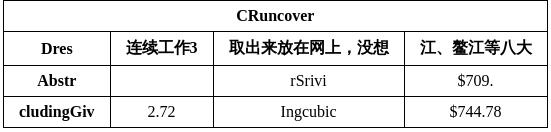
You can also integrate the model inference of the table structure recognition module into your own project. Before running the code below, please download the sample image to your local machine.
from paddleocr import TableStructureRecognition
model = TableStructureRecognition(model_name="SLANet")
output = model.predict(input="table_recognition.jpg", batch_size=1)
for res in output:
    res.print(json_format=False)
    res.save_to_json("./output/res.json")
The example above uses the paddle_static inference engine by default. To run it, first install PaddlePaddle by following PaddlePaddle Framework Installation.
If you choose transformers as the inference engine, make sure the Transformers environment is configured, and then run the following code:
from paddleocr import TableStructureRecognition
model = TableStructureRecognition(
    model_name="SLANet",
    engine="transformers",
)
output = model.predict(input="table_recognition.jpg", batch_size=1)
for res in output:
    res.print(json_format=False)
    res.save_to_json("./output/res.json")
If you choose onnxruntime as the inference engine, make sure the ONNX Runtime environment is configured, and then run the following code:
from paddleocr import TableStructureRecognition
model = TableStructureRecognition(
    model_name="SLANet",
    engine="onnxruntime",
)
output = model.predict(input="table_recognition.jpg", batch_size=1)
for res in output:
    res.print(json_format=False)
    res.save_to_json("./output/res.json")
In most scenarios, the default paddle_static inference engine delivers better inference performance and is the recommended first choice.
If you want to use the trained model with the paddle_dynamic or transformers engine, refer to the Weight Conversion section in the Inference Engine section below to convert the model from the pdparams format to the safetensors format using PaddleX.
After running, the result is:
{'res': {'input_path': 'table_recognition.jpg', 'page_index': None, 'bbox': [[42, 2, 390, 2, 388, 27, 40, 26], [11, 35, 89, 35, 87, 63, 11, 63], [113, 34, 192, 34, 186, 64, 109, 64], [219, 33, 399, 33, 393, 62, 212, 62], [413, 33, 544, 33, 544, 64, 407, 64], [12, 67, 98, 68, 96, 93, 12, 93], [115, 66, 205, 66, 200, 91, 111, 91], [234, 65, 390, 65, 385, 92, 227, 92], [414, 66, 537, 67, 537, 95, 409, 95], [7, 97, 106, 97, 104, 128, 7, 128], [113, 96, 206, 95, 201, 127, 109, 127], [236, 96, 386, 96, 381, 128, 230, 128], [413, 96, 534, 95, 533, 127, 408, 127]], 'structure': ['<html>', '<body>', '<table>', '<tr>', '<td', ' colspan="4"', '>', '</td>', '</tr>', '<tr>', '<td></td>', '<td></td>', '<td></td>', '<td></td>', '</tr>', '<tr>', '<td></td>', '<td></td>', '<td></td>', '<td></td>', '</tr>', '<tr>', '<td></td>', '<td></td>', '<td></td>', '<td></td>', '</tr>', '</table>', '</body>', '</html>'], 'structure_score': 0.99948007}}
Parameter meanings are as follows:
input_path:The path of the input table image to be predictedpage_index:If the input is a PDF file, indicates the page number of the PDF; otherwise, it isNoneboxes: Predicted table cell information, a list consisting of the coordinates of predicted table cells. Notably, table cell predictions for the SLANeXt series models are invalidstructure:Predicted table structure HTML expressions, a list consisting of predicted HTML keywords in orderstructure_score:Confidence of the predicted table structure
Descriptions of related methods and parameters are as follows:
TableStructureRecognitioninstantiates a table structure recognition model (usingSLANetas an example). Details are as follows:
| Parameter | Description | Type | Default |
|---|---|---|---|
model_name |
Meaning: Model name. Description: If set to None, PP-LCNet_x1_0_table_cls will be used. |
str|None |
None |
model_dir |
Meaning:Model storage path. | str|None |
None |
device |
Meaning:Device for inference. Description: For example: "cpu", "gpu", "npu", "gpu:0", "gpu:0,1".If multiple devices are specified, parallel inference will be performed. By default, GPU 0 is used if available; otherwise, CPU is used. |
str|None |
None |
engine |
Meaning: Inference engine. Description: Supports None (the default), paddle, paddle_static, paddle_dynamic, transformers, and onnxruntime. When left as None, local inference uses the paddle_static engine by default. For detailed descriptions, supported values, compatibility rules, and examples, see Inference Engine and Configuration. |
str|None |
None |
engine_config |
Meaning: Inference-engine configuration. Description: Recommended together with engine. For supported fields, compatibility rules, and examples, see Inference Engine and Configuration. |
dict|None |
None |
enable_hpi |
Meaning:Whether to enable high-performance inference. | bool |
False |
use_tensorrt |
Meaning:Whether to use the Paddle Inference TensorRT subgraph engine. Description: If the model does not support acceleration through TensorRT, setting this flag will not enable acceleration. For Paddle with CUDA version 11.8, the compatible TensorRT version is 8.x (x>=6), and it is recommended to install TensorRT 8.6.1.6. |
bool |
False |
precision |
Meaning:Computation precision when using the Paddle Inference TensorRT subgraph engine. Description: Options: "fp32", "fp16". |
str |
"fp32" |
enable_mkldnn |
Meaning:Whether to enable MKL-DNN acceleration for inference. Description: If MKL-DNN is unavailable or the model does not support it, acceleration will not be used even if this flag is set. |
bool |
True |
mkldnn_cache_capacity |
Meaning:MKL-DNN cache capacity. | int |
10 |
cpu_threads |
Meaning:Number of threads to use for inference on CPUs. | int |
10 |
- Call the
predict()method of the table structure recognition model for inference prediction, which returns a result list. In addition, this module also provides thepredict_iter()method. The two are completely consistent in parameter acceptance and result return. The difference is thatpredict_iter()returns agenerator, which can process and obtain prediction results step by step, suitable for handling large datasets or scenarios where you want to save memory. You can choose to use either method according to your actual needs. Thepredict()method has parametersinputandbatch_size, described as follows:
| Parameter | Description | Type | Default |
|---|---|---|---|
input |
Meaning:Data to be predicted. Required. Description: Supports multiple input types:
|
Python Var|str|list |
|
batch_size |
Meaning:Batch size. Description: Can be set to any positive integer. |
int |
1 |
- For processing prediction results, the prediction result of each sample is the corresponding Result object, and supports printing and saving as a
jsonfile:
| Method | Description | Parameter | Type | Parameter Description | Default |
|---|---|---|---|---|---|
print() |
Print result to terminal | format_json |
bool |
Whether to use JSON indentation formatting for the output |
True |
indent |
int |
Specify indentation level to beautify the output JSON data, making it more readable, effective only when format_json is True |
4 | ||
ensure_ascii |
bool |
Controls whether to escape non-ASCII characters as Unicode. When set to True, all non-ASCII characters will be escaped; False keeps the original characters. Effective only when format_json is True |
False |
||
save_to_json() |
Save result as json format file | save_path |
str |
Path to save the file. If it's a directory, the saved file will be named the same as the input file type | None |
indent |
int |
Specify indentation level to beautify the output JSON data, making it more readable, effective only when format_json is True |
4 | ||
ensure_ascii |
bool |
Controls whether to escape non-ASCII characters as Unicode. When set to True, all non-ASCII characters will be escaped; False keeps the original characters. Effective only when format_json is True |
False |
- In addition, it also supports obtaining results through attributes, as follows:
| Attribute | Description |
|---|---|
json |
Get the prediction result in json format |
4. Secondary Development
If the above models are still not ideal for your scenario, you can try the following steps for secondary development. Here, training SLANet_plus is used as an example, and for other models, just replace the corresponding configuration file. First, you need to prepare a dataset for table structure recognition, which can be prepared with reference to the format of the table structure recognition demo data. Once ready, you can train and export the model as follows. After exporting, you can quickly integrate the model into the above API. Here, the table structure recognition demo data is used as an example. Before training the model, please make sure you have installed the dependencies required by PaddleOCR according to the installation documentation.
4.1 Dataset and Pretrained Model Preparation
4.1.1 Prepare Dataset
# Download sample dataset
wget https://paddle-model-ecology.bj.bcebos.com/paddlex/data/table_rec_dataset_examples.tar
tar -xf table_rec_dataset_examples.tar
4.1.2 Download Pretrained Model
# Download SLANet_plus pretrained model
wget https://paddle-model-ecology.bj.bcebos.com/paddlex/official_pretrained_model/SLANet_plus_pretrained.pdparams
4.2 Model Training
PaddleOCR is modularized. When training the SLANet_plus recognition model, you need to use the configuration file of SLANet_plus.
The training commands are as follows:
# Single card training (default training method)
python3 tools/train.py -c configs/table/SLANet_plus.yml \
    -o Global.pretrained_model=./SLANet_plus_pretrained.pdparams
    Train.dataset.data_dir=./table_rec_dataset_examples \
    Train.dataset.label_file_list='[./table_rec_dataset_examples/train.txt]' \
    Eval.dataset.data_dir=./table_rec_dataset_examples \
    Eval.dataset.label_file_list='[./table_rec_dataset_examples/val.txt]'

# Multi-card training, specify card numbers via --gpus parameter
python3 -m paddle.distributed.launch --gpus '0,1,2,3' tools/train.py \
    -c configs/table/SLANet_plus.yml \
    -o Global.pretrained_model=./SLANet_plus_pretrained.pdparams
    -o Global.pretrained_model=./PP-OCRv5_server_det_pretrained.pdparams \
    Train.dataset.data_dir=./table_rec_dataset_examples \
    Train.dataset.label_file_list='[./table_rec_dataset_examples/train.txt]' \
    Eval.dataset.data_dir=./table_rec_dataset_examples \
    Eval.dataset.label_file_list='[./table_rec_dataset_examples/val.txt]'
4.3 Model Evaluation
You can evaluate the trained weights, such as output/xxx/xxx.pdparams, using the following command:
# Note to set the path of pretrained_model to the local path. If you use the model saved by your own training, please modify the path and file name to {path/to/weights}/{model_name}.
 # Demo test set evaluation
 python3 tools/eval.py -c configs/table/SLANet_plus.yml -o \
    Global.pretrained_model=output/xxx/xxx.pdparams
    Eval.dataset.data_dir=./table_rec_dataset_examples \
    Eval.dataset.label_file_list='[./table_rec_dataset_examples/val.txt]'
4.4 Model Export
 python3 tools/export_model.py -c configs/table/SLANet_plus.yml -o \
    Global.pretrained_model=output/xxx/xxx.pdparams \
    Global.save_inference_dir="./SLANet_plus_infer/"
After exporting the model, the static graph model will be stored in ./SLANet_plus_infer/ in the current directory. In this directory, you will see the following files:
If you want to use the paddle_dynamic or transformers engine with the trained model, please refer to the Weight Conversion section in Inference Engine later in this document to convert the model from the pdparams format to the safetensors format using PaddleX.
5. Inference Engine
For detailed descriptions, values, compatibility rules, and examples of the inference engine, please refer to Inference Engine and Configuration Description.
5.1 Speed Data
| model | engine | Preprocessing (ms) | Inference (ms) | PostProcessing (ms) | End-to-End (ms) |
|---|---|---|---|---|---|
| SLANet | onnxruntime | 1.42 | 22.02 | 0.22 | 23.81 |
| SLANet_plus | onnxruntime | 1.40 | 21.64 | 0.22 | 23.42 |
| SLANeXt_wired | paddle_static | 1.50 | 30.91 | 0.23 | 32.77 |
| paddle_dynamic | 1.71 | 57.44 | 0.91 | 60.23 | |
| transformers | 4.03 | 45.14 | 0.74 | 51.12 | |
| onnxruntime | 1.60 | 30.96 | 0.25 | 32.99 | |
| SLANeXt_wireless | paddle_static | 1.67 | 30.49 | 0.22 | 32.51 |
| paddle_dynamic | 1.68 | 57.24 | 0.96 | 60.05 | |
| transformers | 4.30 | 45.51 | 0.75 | 51.76 | |
| onnxruntime | 1.62 | 31.01 | 0.26 | 33.06 |
Test Environment Description:
- Test Data: Sample Image
- Hardware Configuration:
- GPU: NVIDIA A100 40G
- CPU: Intel(R) Xeon(R) Gold 6248 CPU @ 2.50GHz
- Software Environment:
- Ubuntu 22.04 / CUDA 12.6 / cuDNN 9.5
- paddlepaddle-gpu 3.2.1 / paddleocr 3.5 / transformers 5.4.0 / torch 2.10 / onnxruntime-gpu 1.23.2
5.2 Weight Conversion
When using the inference engine, the system will automatically download the official pre-trained model. If you need to use a self-trained model with the paddle_dynamic or transformers engine, please refer to the PaddleX Table Structure Recognition Module Weight Conversion section to convert the model from the pdparams format to the safetensors format using PaddleX. This allows seamless integration into the PaddleOCR API for inference. If you need to use a self-trained model with the onnxruntime engine, refer to PaddleX Obtain ONNX Models to obtain the ONNX model, so it can be seamlessly integrated into the PaddleOCR API for inference.