PaddleOCR-VL Usage Tutorial
Info
PaddleOCR provides a unified interface for the PaddleOCR-VL model series to facilitate quick setup and usage. Unless otherwise specified, the term "PaddleOCR-VL" in this tutorial and related hardware usage tutorials refers to the PaddleOCR-VL model series (e.g., PaddleOCR-VL-1.6). References specific to the PaddleOCR-VL v1 version will be explicitly noted.
PaddleOCR-VL is an advanced and efficient document parsing model designed specifically for element recognition in documents. Taking its initial version (PaddleOCR-VL v1) as an example, its core component is PaddleOCR-VL-0.9B, a compact yet powerful Vision-Language Model (VLM) composed of a NaViT-style dynamic resolution visual encoder and the ERNIE-4.5-0.3B language model, enabling precise element recognition. The model series supports 109 languages and excels in recognizing complex elements (such as text, tables, formulas, and charts) while maintaining extremely low resource consumption. Comprehensive evaluations on widely used public benchmarks and internal benchmarks demonstrate that PaddleOCR-VL achieves SOTA performance in both page-level document parsing and element-level recognition. It significantly outperforms existing Pipeline-based solutions, document parsing multimodal schemes, and advanced general-purpose multimodal large models, while offering faster inference speeds. These advantages make it highly suitable for deployment in real-world scenarios.
On January 29, 2026, we released PaddleOCR-VL-1.5. PaddleOCR-VL-1.5 not only significantly improved the accuracy on the OmniDocBench v1.5 evaluation set to 94.5%, but also innovatively supports irregular-shaped bounding box localization. As a result, PaddleOCR-VL-1.5 demonstrates outstanding performance in real-world scenarios such as Skew, Warping, Screen Photography, Illumination, and Scanning. In addition, the model has added new capabilities for seal (stamp) recognition and text detection and recognition, with key metrics continuing to lead the industry.
On May 28, 2026, we released PaddleOCR-VL-1.6. With an accuracy of 96.3%, PaddleOCR-VL-1.6 once again set a new benchmark on OmniDocBench v1.6, while also achieving new state-of-the-art (SOTA) results on OmniDocBench v1.5 and Real5-OmniDocBench. It delivers industry-leading performance in text, formula, and table recognition across both open-source and proprietary solutions. In addition, the model shows substantial improvements in ancient document and rare character recognition, as well as significantly enhanced capabilities in multiple scenarios such as seal recognition, spotting, and chart understanding. The model architecture remains fully consistent with PaddleOCR-VL-1.5, enabling seamless migration at zero cost.
PaddleOCR-VL consists of two core stages: layout analysis and VLM-based recognition. The simplified workflow is illustrated as follows:
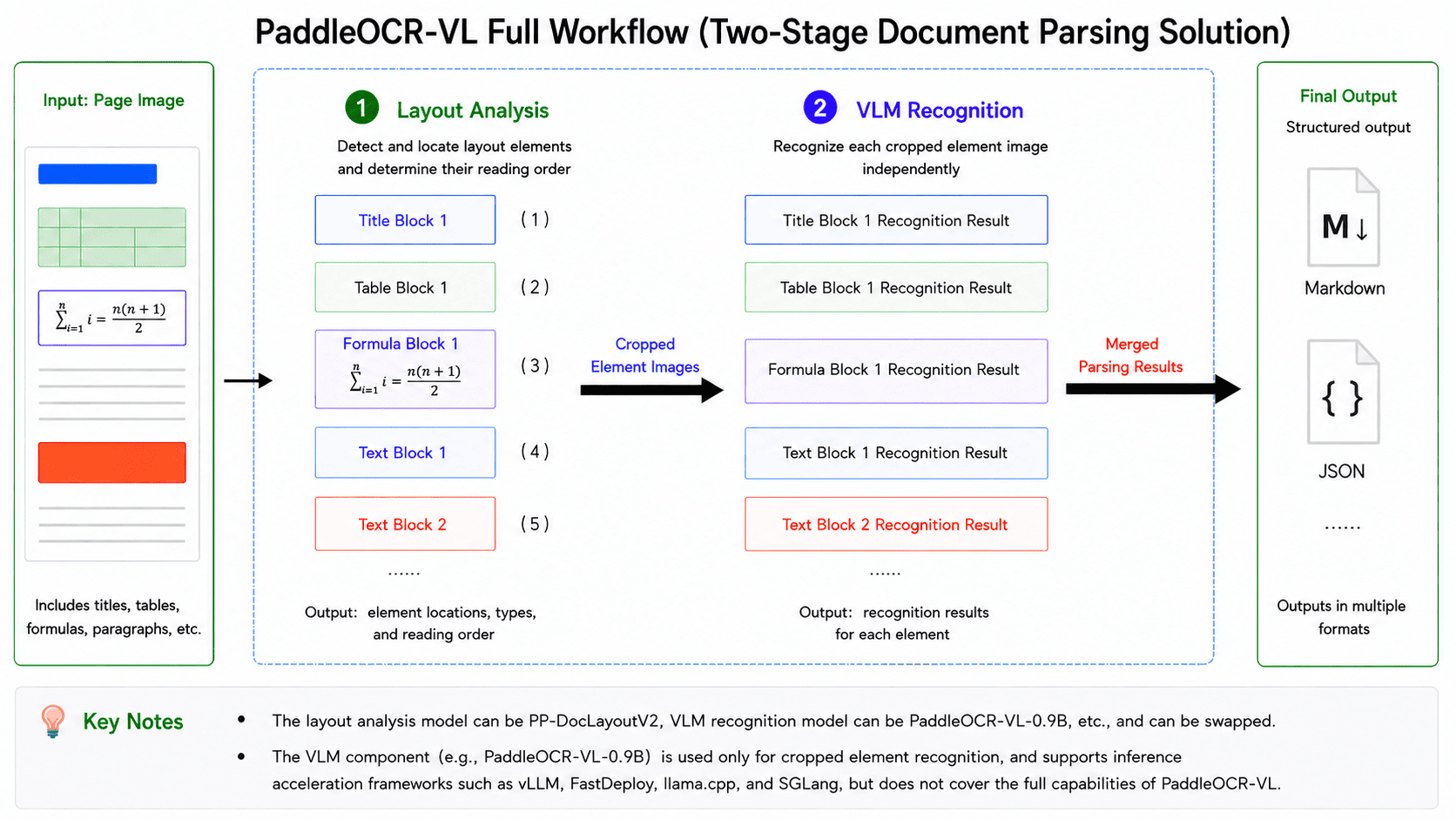
In this pipeline, the first stage is layout analysis: the model takes the entire image as input, detects and localizes various layout elements (e.g., tables and formulas), determines their reading order, and crops the corresponding element-level sub-images based on the detection results. The second stage is VLM-based recognition: each sub-image is independently fed into the VLM to produce its recognition result (e.g., Markdown text), after which all element-level outputs are merged according to the reading order determined in the layout analysis stage to form the complete parsing result of the entire image. Therefore, to fully leverage the capabilities of PaddleOCR-VL, it is necessary to adopt the complete pipeline that integrates layout analysis and VLM-based recognition, rather than using the VLM component alone. This distinction will be referenced multiple times in the following sections, so it is important to clearly differentiate between the full PaddleOCR-VL pipeline and its VLM component. Taking PaddleOCR-VL v1 as an example, the layout analysis model is PP-DocLayoutV2, and the VLM component is PaddleOCR-VL-0.9B. It is important to note that “PaddleOCR-VL-0.9B” does not represent a standalone variant of PaddleOCR-VL, but rather refers specifically to the VLM component within the complete PaddleOCR-VL v1 pipeline. This differs from common naming conventions of LLMs/VLMs—for instance, Qwen2-72B typically denotes a specific model variant within the Qwen2 series.
If issues arise during usage—such as failure to reproduce the performance reported in the paper or on the PaddleOCR official website, or the generation of excessive hallucinated text—the first step is to verify whether the complete PaddleOCR-VL pipeline is being used, rather than only the VLM component. For example, directly running the PaddleOCR-VL-0.9B model locally via Transformers, or sending requests to services such as vLLM, SGLang, or FastDeploy, is not equivalent to executing the full PaddleOCR-VL pipeline.
Start Here
Choose the guide that matches your hardware first.
| Hardware | Read this guide |
|---|---|
| x64 CPU | Continue with this tutorial. Use the manual installation path in Section 1.2; the NVIDIA-only Docker steps do not apply. |
| NVIDIA GPU (except Blackwell) | Continue with this tutorial. |
| NVIDIA Blackwell GPU | Read PaddleOCR-VL NVIDIA Blackwell-Architecture GPUs Usage Tutorial. |
| Apple Silicon | Read PaddleOCR-VL Apple Silicon Usage Tutorial. |
| Kunlunxin XPU | Read PaddleOCR-VL Kunlunxin XPU Usage Tutorial. |
| Hygon DCU | Read PaddleOCR-VL Hygon DCU Usage Tutorial. |
| MetaX GPU | Read PaddleOCR-VL MetaX GPU Usage Tutorial. |
| Iluvatar GPU | Read PaddleOCR-VL Iluvatar GPU Usage Tutorial. |
| Huawei Ascend NPU | Read PaddleOCR-VL Huawei Ascend NPU Usage Tutorial. |
| AMD GPU | Read PaddleOCR-VL AMD GPU Usage Tutorial. |
| Intel Arc GPU | Read PaddleOCR-VL Intel Arc GPU Usage Tutorial. |
If you just want to first confirm which hardware PaddleOCR-VL can be deployed on, or which inference methods are supported by specific hardware, read the PaddleOCR-VL Inference Method and Hardware Support Matrix before continuing.
PaddleOCR-VL Inference Method and Hardware Support Matrix
| Inference Method | NVIDIA GPU | Kunlunxin XPU | Hygon DCU | MetaX GPU | Iluvatar GPU | Huawei Ascend NPU | x64 CPU | Apple Silicon | AMD GPU | Intel Arc GPU |
|---|---|---|---|---|---|---|---|---|---|---|
| PaddlePaddle | ✅ | ✅ | ✅ | ✅ | ✅ | 🚧 | ✅ | ✅ | ✅ | 🚧 |
| Transformers | ✅ | 🚧 | 🚧 | 🚧 | 🚧 | 🚧 | ✅ | 🚧 | 🚧 | 🚧 |
| PaddlePaddle + vLLM | ✅ | 🚧 | ✅ | 🚧 | 🚧 | ✅ | ❌ | ❌ | ✅ | ✅ |
| PaddlePaddle + SGLang | ✅ | 🚧 | 🚧 | 🚧 | 🚧 | 🚧 | ❌ | ❌ | 🚧 | 🚧 |
| PaddlePaddle + FastDeploy | ✅ | ✅ | 🚧 | ✅ | ✅ | 🚧 | ❌ | ❌ | 🚧 | 🚧 |
| PaddlePaddle + MLX-VLM | ❌ | ❌ | ❌ | ❌ | ❌ | ❌ | ❌ | ✅ | ❌ | ❌ |
| PaddlePaddle + llama.cpp | ✅ | 🚧 | 🚧 | 🚧 | 🚧 | 🚧 | ✅ | 🚧 | 🚧 | 🚧 |
| Transformers + vLLM | ✅ | 🚧 | 🚧 | 🚧 | 🚧 | 🚧 | ❌ | ❌ | 🚧 | 🚧 |
| Transformers + SGLang | ✅ | 🚧 | 🚧 | 🚧 | 🚧 | 🚧 | ❌ | ❌ | 🚧 | 🚧 |
| Transformers + FastDeploy | ✅ | 🚧 | 🚧 | 🚧 | 🚧 | 🚧 | ❌ | ❌ | 🚧 | 🚧 |
| Transformers + MLX-VLM | ❌ | ❌ | ❌ | ❌ | ❌ | ❌ | ❌ | ✅ | ❌ | ❌ |
| Transformers + llama.cpp | ✅ | 🚧 | 🚧 | 🚧 | 🚧 | 🚧 | ✅ | 🚧 | 🚧 | 🚧 |
Status Legend
✅: Supported.🚧: In progress or pending further verification.❌: Not currently supported or not applicable.
Inference Method Notes
PaddlePaddle means that both the layout analysis model and the VLM run locally using the PaddlePaddle framework. In practice, each module is resolved to paddle_static or paddle_dynamic depending on the model form. Transformers means that both the layout analysis model and the VLM run locally via the transformers engine. The remaining methods follow the format layout analysis model inference method + VLM inference method, where the VLM part is handled by a separate inference service; for example, PaddlePaddle + vLLM means the layout analysis model runs locally on the client using PaddlePaddle, while the VLM is served by vLLM.
Additional Notes for Interpreting the Matrix
- vLLM, SGLang, and FastDeploy cannot run natively on Windows. Please use our Docker images.
- Due to dependency conflicts between different libraries, mixed inference methods such as Transformers + vLLM usually require deploying the layout analysis model and the VLM service in separate environments.
Environment Requirements
- When using NVIDIA GPUs for inference, ensure that the Compute Capability (CC) and CUDA version meet the requirements:
- PaddlePaddle: CC ≥ 7.0, CUDA ≥ 11.8
- Transformers: CC ≥ 7.0, CUDA ≥ 11.8
- vLLM: CC ≥ 8.0, CUDA ≥ 12.6
- SGLang: 8.0 ≤ CC < 12.0, CUDA ≥ 12.6
- FastDeploy: 8.0 ≤ CC < 12.0, CUDA ≥ 12.6
- Common GPUs with CC ≥ 8 include the RTX 30/40/50 series and A10/A100. See CUDA GPU Compute Capability for more models.
- Although vLLM can start on NVIDIA GPUs with CC 7.x, such as T4/V100, it is prone to timeouts or OOM and is therefore not recommended.
Workflow Guide for This Tutorial
This tutorial is the default path for x64 CPU users and NVIDIA GPU users other than Blackwell.
| Goal | Availability in this tutorial | Read this section |
|---|---|---|
| Local direct inference | Supported. x64 CPU users should use the manual installation path in Section 1.2. | Read Section 1. Local Runtime Environment Preparation and Section 2. Quick Start. |
| Client + VLM inference service | Supported. | Complete local direct inference first, then read Section 3. Using VLM Inference Services. |
| Full API service | Supported. x64 CPU users should use the manual deployment path; non-Blackwell NVIDIA GPU users can use Docker Compose or manual deployment. | Read Section 4. Service Deployment: use Section 4.1 for Docker Compose, or Section 4.2 for manual deployment (complete Section 1. Local Runtime Environment Preparation first). For higher concurrency, refer to the High-Performance Service Deployment solution. |
| Model fine-tuning | Supported. | Read Section 5. Model Fine-Tuning. |
1. Local Runtime Environment Preparation
This section explains how to set up the local runtime environment for PaddleOCR-VL. This tutorial mainly applies to x64 CPU users and NVIDIA GPU users other than Blackwell. For other hardware, please refer first to the dedicated tutorials listed above.
This tutorial provides the following two methods for local runtime environment preparation:
-
Method 1: Use the official Docker image (NVIDIA GPU only).
-
Method 2: Manually install the inference engine and PaddleOCR (available for both x64 CPU and NVIDIA GPU).
We strongly recommend using the Docker image to minimize potential environment-related issues.
1.1 Method 1: Using Docker Image
We recommend using the official Docker image (requires Docker version >= 19.03, GPU-equipped machine with NVIDIA drivers supporting CUDA 12.6 or later):
docker run \
    -it \
    --gpus all \
    --network host \
    --user root \
    ccr-2vdh3abv-pub.cnc.bj.baidubce.com/paddlepaddle/paddleocr-vl:latest-nvidia-gpu \
    /bin/bash
# Invoke PaddleOCR CLI or Python API within the container
If you need to use PaddleOCR-VL in an offline environment, replace ccr-2vdh3abv-pub.cnc.bj.baidubce.com/paddlepaddle/paddleocr-vl:latest-nvidia-gpu (image size approximately 8 GB) in the above command with the offline version image ccr-2vdh3abv-pub.cnc.bj.baidubce.com/paddlepaddle/paddleocr-vl:latest-nvidia-gpu-offline (image size is approximately 10 GB). You will need to pull the image on an internet-connected machine, import it into the offline machine, and then start the container using this image on the offline machine. For example:
# Execute on an internet-connected machine
docker pull ccr-2vdh3abv-pub.cnc.bj.baidubce.com/paddlepaddle/paddleocr-vl:latest-nvidia-gpu-offline
# Save the image to a file
docker save ccr-2vdh3abv-pub.cnc.bj.baidubce.com/paddlepaddle/paddleocr-vl:latest-nvidia-gpu-offline -o paddleocr-vl-latest-nvidia-gpu-offline.tar

# Transfer the image file to the offline machine

# Execute on the offline machine
docker load -i paddleocr-vl-latest-nvidia-gpu-offline.tar
# After that, you can use `docker run` to start the container on the offline machine
The image comes preinstalled with the PaddlePaddle framework and does not include any other inference engines. If you want to use other inference engines, it is recommended to install them manually using Method 2 (it is not recommended to install them in an environment where the PaddlePaddle framework is preinstalled).
Tip
Images with the latest-xxx tag correspond to the latest version.
If the corresponding latest image already exists locally and you want the newest features or fixes, we recommend running docker pull again before using it.
If you want to use a specific version of the image, you can replace latest in the tag with the desired PaddleOCR version number: paddleocr<major>.<minor>.
For example:
ccr-2vdh3abv-pub.cnc.bj.baidubce.com/paddlepaddle/paddleocr-vl:paddleocr3.3-nvidia-gpu-offline
1.2 Method 2: Manually Install the Inference Engine and PaddleOCR
If you cannot use Docker, you can manually install the inference engine and PaddleOCR. This guide documents Python 3.9–3.13 as the verified range.
We strongly recommend installing PaddleOCR-VL in a virtual environment to avoid dependency conflicts. For example, use the Python venv standard library to create a virtual environment:
# Create a virtual environment
python -m venv .venv_paddleocr
# Activate the environment
source .venv_paddleocr/bin/activate
Please first install the dependencies corresponding to your chosen inference engine:
- If you use PaddlePaddle for inference, install PaddlePaddle 3.2.1 or later (do not install both the CPU and GPU versions of PaddlePaddle at the same time). Common installation commands are as follows:
# NVIDIA GPU (CUDA 12.6 as an example)
python -m pip install paddlepaddle-gpu==3.2.1 -i https://www.paddlepaddle.org.cn/packages/stable/cu126/

# x64 CPU
python -m pip install paddlepaddle==3.2.1 -i https://www.paddlepaddle.org.cn/packages/stable/cpu/
For other CUDA versions, please refer to the PaddlePaddle installation guide: https://www.paddlepaddle.org.cn/install/quick?docurl=/documentation/docs/en/develop/install/pip/linux-pip_en.html
- If you use
transformersfor inference, refer to the official Transformers documentation to installtransformersand the required low-level inference framework dependencies.
After installing the inference engine, run the following command to install the base package required by PaddleOCR-VL:
2. Quick Start
This section introduces how to use PaddleOCR-VL through the CLI and Python API.
PaddleOCR-VL supports both CLI and Python API usage. The CLI method is simpler and suitable for quick verification, while the Python API is more flexible and suitable for integration into existing projects. The examples below use local PaddlePaddle by default, with each module resolving to paddle_static or paddle_dynamic as appropriate. To switch to the transformers engine, append --engine transformers in the CLI, or pass engine="transformers" when initializing the Python API.
Important
The methods introduced in this section are primarily for rapid validation. Their inference speed, memory usage, and stability may not meet the requirements of a production environment. If deployment to a production environment is needed, we strongly recommend using a dedicated VLM inference service. For specific methods, please refer to the next section.
2.1 Command Line Usage
When you run PaddleOCR-VL for the first time, it will automatically download the official model files. Please make sure the current environment has internet access and allow some extra time for downloading and initialization.
The following are ready-to-copy example commands. For the first try, we recommend adding --save_path ./output so that you can inspect the saved results in the current directory:
# NVIDIA GPU
paddleocr doc_parser -i https://paddle-model-ecology.bj.bcebos.com/paddlex/imgs/demo_image/paddleocr_vl_demo.png --save_path ./output

# Kunlunxin XPU
paddleocr doc_parser -i https://paddle-model-ecology.bj.bcebos.com/paddlex/imgs/demo_image/paddleocr_vl_demo.png --device xpu --save_path ./output

# Hygon DCU
paddleocr doc_parser -i https://paddle-model-ecology.bj.bcebos.com/paddlex/imgs/demo_image/paddleocr_vl_demo.png --device dcu --save_path ./output

# MetaX GPU
paddleocr doc_parser -i https://paddle-model-ecology.bj.bcebos.com/paddlex/imgs/demo_image/paddleocr_vl_demo.png --device metax_gpu --save_path ./output

# Apple Silicon
paddleocr doc_parser -i https://paddle-model-ecology.bj.bcebos.com/paddlex/imgs/demo_image/paddleocr_vl_demo.png --device cpu --save_path ./output

# Huawei Ascend NPU
# For Huawei Ascend NPU, please refer to Chapter 3 and use PaddlePaddle + vLLM for inference

# Use --use_doc_orientation_classify to enable document orientation classification
paddleocr doc_parser -i https://paddle-model-ecology.bj.bcebos.com/paddlex/imgs/demo_image/paddleocr_vl_demo.png --use_doc_orientation_classify True --save_path ./output

# Use --use_doc_unwarping to enable the document unwarping module
paddleocr doc_parser -i https://paddle-model-ecology.bj.bcebos.com/paddlex/imgs/demo_image/paddleocr_vl_demo.png --use_doc_unwarping True --save_path ./output

# Use --use_layout_detection to disable the layout analysis and ordering module
paddleocr doc_parser -i https://paddle-model-ecology.bj.bcebos.com/paddlex/imgs/demo_image/paddleocr_vl_demo.png --use_layout_detection False --save_path ./output
After successful execution, the terminal will print the structured result. If you set --save_path ./output, the result files will also be saved under the output directory in the current working directory for further inspection and debugging.
To switch to the transformers engine, use:
paddleocr doc_parser -i https://paddle-model-ecology.bj.bcebos.com/paddlex/imgs/demo_image/paddleocr_vl_demo.png --engine transformers --save_path ./output
Command line supports more parameters. Click to expand for detailed parameter descriptions
| Parameter | Description | Type | Default |
|---|---|---|---|
input |
Meaning:Data to be predicted, required. Description: For example, the local path of an image file or PDF file: /root/data/img.jpg;Such as a URL link, for example, the network URL of an image file or PDF file:Example;Such as a local directory, which should contain the images to be predicted, for example, the local path: /root/data/(Currently, prediction for directories containing PDF files is not supported. PDF files need to be specified with a specific file path). |
str |
|
save_path |
Meaning:Specify the path where the inference result file will be saved. Description: If not set, the inference results will not be saved locally. |
str |
|
pipeline_version |
Meaning: Specifies the pipeline version. Description: The currently available values are "v1", "v1.5", and "v1.6".
|
str |
"v1.6" |
layout_detection_model_name |
Meaning:Name of the layout analysis model. Description: If not set, the default model of the production line will be used. |
str |
|
layout_detection_model_dir |
Meaning:Directory path of the layout analysis model. Description: If not set, the official model will be downloaded. |
str |
|
layout_threshold |
Meaning:Score threshold for the layout model. Description: Any value between 0-1. If not set, the default value is used, which is 0.5.
| float |
|
layout_nms |
Meaning:Whether to use post-processing NMS for layout analysis. Description: If not set, the initialized default value will be used. |
bool |
|
layout_unclip_ratio |
Meaning:Expansion coefficient for the detection boxes of the layout area detection model. Description: Any floating-point number greater than 0. If not set, the initialized default value will be used. |
float |
|
layout_merge_bboxes_mode |
Meaning:Merging mode for the detection boxes output by the model in layout analysis. Description:
|
str |
|
vl_rec_model_name |
Meaning:Name of the multimodal recognition model. Description: If not set, the default model will be used. |
str |
|
vl_rec_model_dir |
Meaning:Directory path of the multimodal recognition model. Description: If not set, the official model will be downloaded. |
str |
|
vl_rec_backend |
Meaning:Inference backend used by the multimodal recognition model. | str |
|
vl_rec_server_url |
Description:If the multimodal recognition model uses an inference service, this parameter is used to specify the server URL. | str |
|
vl_rec_max_concurrency |
Meaning:If the multimodal recognition model uses an inference service, this parameter is used to specify the maximum number of concurrent requests. | int |
|
vl_rec_api_model_name |
Meaning:If the multimodal recognition model uses an inference service, this parameter is used to specify the model name of the service. | str |
|
vl_rec_api_key |
Meaning:If the multimodal recognition model uses an inference service, this parameter is used to specify the API key of the service. | str |
|
doc_orientation_classify_model_name |
Meaning:Name of the document orientation classification model. Description: If not set, the initialized default value will be used. |
str |
|
doc_orientation_classify_model_dir |
Meaning:Directory path of the document orientation classification model. Description: If not set, the official model will be downloaded. |
str |
|
doc_unwarping_model_name |
Meaning:Name of the text image rectification model. Description: If not set, the initialized default value will be used. |
str |
|
doc_unwarping_model_dir |
Meaning:Directory path of the text image rectification model. Description: If not set, the official model will be downloaded. |
str |
|
use_doc_orientation_classify |
Meaning:Whether to load and use the document orientation classification module. Description: If not set, the initialized default value will be used, which is initialized to False. |
bool |
|
use_doc_unwarping |
Meaning:Whether to load and use the text image rectification module. Description: If not set, the initialized default value will be used, which is initialized to False. |
bool |
|
use_layout_detection |
Meaning:Whether to load and use the layout analysis module. Description: If not set, the initialized default value will be used, which is initialized to True. |
bool |
|
use_chart_recognition |
Meaning:Whether to use the chart parsing function. Description: If not set, the initialized default value will be used, which is initialized to False. |
bool |
|
use_seal_recognition |
Meaning:Whether to use the seal recognition function. Description: If not set, the initialized default value will be used, which defaults to initialization as False. |
bool |
|
use_ocr_for_image_block |
Meaning:Whether to perform OCR on text within image blocks. Description: If not set, the initialized default value will be used, which defaults to initialization as False. |
bool |
|
format_block_content |
Meaning:Controls whether to format the block_content content within as Markdown. Description: If not set, the initialized default value will be used, which defaults to initialization as False. |
bool |
|
merge_layout_blocks |
Meaning:Control whether to merge the layout detection boxes for cross-column or staggered top and bottom columns. Description: If not set, the initialized default value will be used, which defaults to initialization as True. |
bool |
|
markdown_ignore_labels |
Meaning:Layout labels that need to be ignored in Markdown. Description: If not set, the initialized default value will be used, which defaults to initialization as ['number','footnote','header','header_image','footer','footer_image','aside_text']. |
str |
|
layout_shape_mode |
Meaning:Specifies the geometric representation mode for layout analysis results. It defines how the boundaries of detected regions (e.g., text blocks, images, tables) are calculated and displayed. Description: Value descriptions:
|
str |
"auto" |
use_queues |
Meaning:Used to control whether to enable internal queues. Description: When set to True, data loading (such as rendering PDF pages as images), layout analysis model processing, and VLM inference will be executed asynchronously in separate threads, with data passed through queues, thereby improving efficiency. This approach is particularly efficient for PDF documents with a large number of pages or directories containing a large number of images or PDF files. If not set, the initialized default value will be used, which defaults to initialization as True. |
bool |
|
prompt_label |
Meaning:The prompt type setting for the VL model, which takes effect if and only if use_layout_detection=False. |
str |
|
repetition_penalty |
Meaning:The repetition penalty parameter used in VL model sampling. | float |
|
temperature |
Meaning:The temperature parameter used in VL model sampling. | float |
|
top_p |
Meaning:The top-p parameter used in VL model sampling. | float |
|
min_pixels |
Meaning:The minimum number of pixels allowed when the VL model preprocesses images. | int |
|
max_pixels |
Meaning:The maximum number of pixels allowed when the VL model preprocesses images. | int |
|
device |
Meaning:The device used for inference. Description: Supports specifying specific card numbers:
|
str |
|
engine |
Meaning: Inference engine. Description: Supports None (the default), paddle, paddle_static, paddle_dynamic, and transformers. When left as None, PaddleOCR preserves the behavior of earlier versions, which in most configurations is equivalent to paddle. For detailed descriptions, supported values, compatibility rules, and examples, see Inference Engine and Configuration. |
str|None |
None |
enable_hpi |
Meaning: Whether to enable high-performance inference. | bool |
None |
use_tensorrt |
Meaning: Whether to enable the TensorRT subgraph engine of Paddle Inference. Description: If the model does not support TensorRT acceleration, acceleration will not be used even if this flag is set. For CUDA 11.8 versions of PaddlePaddle, the compatible TensorRT version is 8.x (x>=6). TensorRT 8.6.1.6 is recommended. |
bool |
False |
precision |
Meaning: Computation precision, such as fp32 or fp16. |
str |
fp32 |
enable_mkldnn |
Meaning: Whether to enable MKL-DNN accelerated inference. Description: If MKL-DNN is unavailable or the model does not support MKL-DNN acceleration, acceleration will not be used even if this flag is set. |
bool |
True |
mkldnn_cache_capacity |
Meaning: MKL-DNN cache capacity. | int |
10 |
cpu_threads |
Meaning: Number of threads used for inference on CPU. | int |
10 |
paddlex_config |
Meaning: Path to the PaddleX pipeline configuration file. | str |
The inference result will be printed in the terminal. The default output of PaddleOCR-VL is as follows:
👉Click to expand
{'res': {'input_path': 'paddleocr_vl_demo.png', 'page_index': None, 'model_settings': {'use_doc_preprocessor': False, 'use_layout_detection': True, 'use_chart_recognition': False, 'format_block_content': False}, 'layout_det_res': {'input_path': None, 'page_index': None, 'boxes': [{'cls_id': 6, 'label': 'doc_title', 'score': 0.9636914134025574, 'coordinate': [np.float32(131.31366), np.float32(36.450516), np.float32(1384.522), np.float32(127.984665)]}, {'cls_id': 22, 'label': 'text', 'score': 0.9281806349754333, 'coordinate': [np.float32(585.39465), np.float32(158.438), np.float32(930.2184), np.float32(182.57469)]}, {'cls_id': 22, 'label': 'text', 'score': 0.9840355515480042, 'coordinate': [np.float32(9.023666), np.float32(200.86115), np.float32(361.41583), np.float32(343.8828)]}, {'cls_id': 14, 'label': 'image', 'score': 0.9871416091918945, 'coordinate': [np.float32(775.50574), np.float32(200.66502), np.float32(1503.3807), np.float32(684.9304)]}, {'cls_id': 22, 'label': 'text', 'score': 0.9801855087280273, 'coordinate': [np.float32(9.532196), np.float32(344.90594), np.float32(361.4413), np.float32(440.8244)]}, {'cls_id': 17, 'label': 'paragraph_title', 'score': 0.9708921313285828, 'coordinate': [np.float32(28.040405), np.float32(455.87976), np.float32(341.7215), np.float32(520.7117)]}, {'cls_id': 24, 'label': 'vision_footnote', 'score': 0.9002962708473206, 'coordinate': [np.float32(809.0692), np.float32(703.70044), np.float32(1488.3016), np.float32(750.5238)]}, {'cls_id': 22, 'label': 'text', 'score': 0.9825374484062195, 'coordinate': [np.float32(8.896561), np.float32(536.54895), np.float32(361.05237), np.float32(655.8058)]}, {'cls_id': 22, 'label': 'text', 'score': 0.9822263717651367, 'coordinate': [np.float32(8.971573), np.float32(657.4949), np.float32(362.01715), np.float32(774.625)]}, {'cls_id': 22, 'label': 'text', 'score': 0.9767460823059082, 'coordinate': [np.float32(9.407074), np.float32(776.5216), np.float32(361.31067), np.float32(846.82874)]}, {'cls_id': 22, 'label': 'text', 'score': 0.9868153929710388, 'coordinate': [np.float32(8.669495), np.float32(848.2543), np.float32(361.64703), np.float32(1062.8568)]}, {'cls_id': 22, 'label': 'text', 'score': 0.9826608300209045, 'coordinate': [np.float32(8.8025055), np.float32(1063.8615), np.float32(361.46588), np.float32(1182.8524)]}, {'cls_id': 22, 'label': 'text', 'score': 0.982555627822876, 'coordinate': [np.float32(8.820602), np.float32(1184.4663), np.float32(361.66394), np.float32(1302.4507)]}, {'cls_id': 22, 'label': 'text', 'score': 0.9584776759147644, 'coordinate': [np.float32(9.170288), np.float32(1304.2161), np.float32(361.48898), np.float32(1351.7483)]}, {'cls_id': 22, 'label': 'text', 'score': 0.9782056212425232, 'coordinate': [np.float32(389.1618), np.float32(200.38202), np.float32(742.7591), np.float32(295.65146)]}, {'cls_id': 22, 'label': 'text', 'score': 0.9844875931739807, 'coordinate': [np.float32(388.73303), np.float32(297.18463), np.float32(744.00024), np.float32(441.3034)]}, {'cls_id': 17, 'label': 'paragraph_title', 'score': 0.9680547714233398, 'coordinate': [np.float32(409.39468), np.float32(455.89386), np.float32(721.7174), np.float32(520.9387)]}, {'cls_id': 22, 'label': 'text', 'score': 0.9741666913032532, 'coordinate': [np.float32(389.71606), np.float32(536.8138), np.float32(742.7112), np.float32(608.00165)]}, {'cls_id': 22, 'label': 'text', 'score': 0.9840384721755981, 'coordinate': [np.float32(389.30988), np.float32(609.39636), np.float32(743.09247), np.float32(750.3231)]}, {'cls_id': 22, 'label': 'text', 'score': 0.9845995306968689, 'coordinate': [np.float32(389.13272), np.float32(751.7772), np.float32(743.058), np.float32(894.8815)]}, {'cls_id': 22, 'label': 'text', 'score': 0.984852135181427, 'coordinate': [np.float32(388.83267), np.float32(896.0371), np.float32(743.58215), np.float32(1038.7345)]}, {'cls_id': 22, 'label': 'text', 'score': 0.9804865717887878, 'coordinate': [np.float32(389.08478), np.float32(1039.9119), np.float32(742.7585), np.float32(1134.4897)]}, {'cls_id': 22, 'label': 'text', 'score': 0.986461341381073, 'coordinate': [np.float32(388.52643), np.float32(1135.8137), np.float32(743.451), np.float32(1352.0085)]}, {'cls_id': 22, 'label': 'text', 'score': 0.9869391918182373, 'coordinate': [np.float32(769.8341), np.float32(775.66235), np.float32(1124.9813), np.float32(1063.207)]}, {'cls_id': 22, 'label': 'text', 'score': 0.9822869896888733, 'coordinate': [np.float32(770.30383), np.float32(1063.938), np.float32(1124.8295), np.float32(1184.2192)]}, {'cls_id': 17, 'label': 'paragraph_title', 'score': 0.9689218997955322, 'coordinate': [np.float32(791.3042), np.float32(1199.3169), np.float32(1104.4521), np.float32(1264.6985)]}, {'cls_id': 22, 'label': 'text', 'score': 0.9713128209114075, 'coordinate': [np.float32(770.4253), np.float32(1279.6072), np.float32(1124.6917), np.float32(1351.8672)]}, {'cls_id': 22, 'label': 'text', 'score': 0.9236552119255066, 'coordinate': [np.float32(1153.9058), np.float32(775.5814), np.float32(1334.0654), np.float32(798.1581)]}, {'cls_id': 22, 'label': 'text', 'score': 0.9857938885688782, 'coordinate': [np.float32(1151.5197), np.float32(799.28015), np.float32(1506.3619), np.float32(991.1156)]}, {'cls_id': 22, 'label': 'text', 'score': 0.9820687174797058, 'coordinate': [np.float32(1151.5686), np.float32(991.91095), np.float32(1506.6023), np.float32(1110.8875)]}, {'cls_id': 22, 'label': 'text', 'score': 0.9866049885749817, 'coordinate': [np.float32(1151.6919), np.float32(1112.1301), np.float32(1507.1611), np.float32(1351.9504)]}]}}}
For detailed descriptions of the running results and saving interfaces, refer to the result explanation in 2.2 Python Script Integration.
Note: Since the default model of PaddleOCR-VL is relatively large, inference may be slow. For actual use, it is recommended to use 3. Using VLM Inference Services for faster inference.
2.2 Python Script Integration
The command line method is intended for quick testing and visualization. In real projects, you usually integrate the model through code. You can quickly run PaddleOCR-VL inference with just a few lines of code:
from pathlib import Path

from paddleocr import PaddleOCRVL

output_dir = Path("./output")
output_dir.mkdir(parents=True, exist_ok=True)

# NVIDIA GPU
pipeline = PaddleOCRVL()
# Kunlunxin XPU
# pipeline = PaddleOCRVL(device="xpu")
# Hygon DCU
# pipeline = PaddleOCRVL(device="dcu")
# MetaX GPU
# pipeline = PaddleOCRVL(device="metax_gpu")
# Apple Silicon
# pipeline = PaddleOCRVL(device="cpu")
# Huawei Ascend NPU
# Huawei Ascend NPU please refer to Chapter 3 for inference using PaddlePaddle + vLLM

# pipeline = PaddleOCRVL(use_doc_orientation_classify=True) # Use use_doc_orientation_classify to enable/disable document orientation classification model
# pipeline = PaddleOCRVL(use_doc_unwarping=True) # Use use_doc_unwarping to enable/disable document unwarping module
# pipeline = PaddleOCRVL(use_layout_detection=False) # Use use_layout_detection to enable/disable layout analysis module

output = pipeline.predict("https://paddle-model-ecology.bj.bcebos.com/paddlex/imgs/demo_image/paddleocr_vl_demo.png")
for res in output:
    res.print() ## Print the structured prediction output
    res.save_to_json(save_path=output_dir) ## Save the current image's structured result in JSON format
    res.save_to_markdown(save_path=output_dir) ## Save the current image's result in Markdown format
    res.save_to_word(save_path="output") ## Save the current image's result in Word format
To switch to the transformers engine, use:
from pathlib import Path

from paddleocr import PaddleOCRVL

output_dir = Path("./output")
output_dir.mkdir(parents=True, exist_ok=True)

pipeline = PaddleOCRVL(engine="transformers")
output = pipeline.predict("https://paddle-model-ecology.bj.bcebos.com/paddlex/imgs/demo_image/paddleocr_vl_demo.png")
for res in output:
    res.print() ## Print the structured prediction output
    res.save_to_json(save_path=output_dir) ## Save the current image's structured result in JSON format
    res.save_to_markdown(save_path=output_dir) ## Save the current image's result in Markdown format
    res.save_to_word(save_path="output") ## Save the current image's result in Word format
For PDF files, each page will be processed individually, and a separate Markdown file will be generated for each page. If you wish to perform cross-page table merging, reconstruct multi-level headings, or merge multi-page results, you can achieve this using the following method:
from pathlib import Path

from paddleocr import PaddleOCRVL

input_file = "./your_pdf_file.pdf"
output_dir = Path("./output")
output_dir.mkdir(parents=True, exist_ok=True)

pipeline = PaddleOCRVL()

output = pipeline.predict(input=input_file)

pages_res = list(output)

output = pipeline.restructure_pages(pages_res)
# output = pipeline.restructure_pages(pages_res, merge_tables=True) # Merge tables across pages
# output = pipeline.restructure_pages(pages_res, merge_tables=True, relevel_titles=True) # Merge tables across pages and reconstruct multi-level titles
# output = pipeline.restructure_pages(pages_res, merge_tables=True, relevel_titles=True, concatenate_pages=True) # Merge tables across pages, reconstruct multi-level titles, and merge multiple pages

for res in output:
    res.print() ## Print the structured prediction output
    res.save_to_json(save_path=output_dir) ## Save the current image's structured result in JSON format
    res.save_to_markdown(save_path=output_dir) ## Save the current image's result in Markdown format
If you need to process multiple files, it is recommended to pass the directory path containing the files or a list of file paths to the predict method to maximize processing efficiency. For example:
# The `imgs` directory contains multiple images to be processed: file1.png, file2.png, file3.png
# Pass the directory path
output = pipeline.predict("imgs")
# Or pass a list of file paths
output = pipeline.predict(["imgs/file1.png", "imgs/file2.png", "imgs/file3.png"])
# Both of the above methods are more efficient than the following approach:
# for file in ["imgs/file1.png", "imgs/file2.png", "imgs/file3.png"]:
#     output = pipeline.predict(file)
Note:
- In the example code above, the
use_doc_orientation_classifyanduse_doc_unwarpingparameters are both set toFalseby default, meaning document orientation classification and document unwarping are disabled. If you need these features, set them toTruemanually.
The above Python script performs the following steps:
(1) Instantiate the pipeline object. Specific parameter descriptions are as follows:
| Parameter | Parameter Description | Parameter Type | Default Value | |
|---|---|---|---|---|
pipeline_version |
Meaning: Specifies the pipeline version. Description: The currently available values are "v1", "v1.5", and "v1.6".
|
str |
"v1.6" | |
layout_detection_model_name |
Meaning:Name of the layout analysis model. Description: If set to None, the default model of the production line will be used. |
str|None |
None |
|
layout_detection_model_dir |
Meaning:Directory path of the layout analysis model. Description: If set to None, the official model will be downloaded. |
str|None |
None |
|
layout_threshold |
Meaning:Score threshold for the layout model. Description:
| float|dict|None |
None |
|
layout_nms |
Meaning:Whether to use post-processing NMS for layout analysis. Description: If set to None, the parameter value initialized by the production line will be used. |
bool|None |
None |
|
layout_unclip_ratio |
Meaning:Expansion coefficient for the detection box of the layout area detection model. Description:
| float|Tuple[float,float]|dict|None |
None |
|
layout_merge_bboxes_mode
Meaning:Merging mode for the detection boxes output by the model in layout analysis. |
Description: None, the initialized parameter value will be used.
str|dict|NoneNone | |||
vl_rec_model_name |
Meaning:Name of the multimodal recognition model. Description: If set to None, the default model will be used. |
str|None |
None |
|
vl_rec_model_dir |
Meaning:Directory path of the multimodal recognition model. Description: If set to None, the official model will be downloaded. |
str|None |
None |
|
vl_rec_backend |
Meaning:Inference backend used by the multimodal recognition model. | str|None |
None |
|
vl_rec_server_url |
Meaning:If the multimodal recognition model uses an inference service, this parameter is used to specify the server URL. | str|None |
None |
|
vl_rec_max_concurrency |
Meaning:If the multimodal recognition model uses an inference service, this parameter is used to specify the maximum number of concurrent requests. | int|None |
None |
|
vl_rec_api_model_name |
Meaning:If the multimodal recognition model uses an inference service, this parameter is used to specify the model name of the service. | str|None |
None |
|
vl_rec_api_key |
Meaning:If the multimodal recognition model uses an inference service, this parameter is used to specify the API key of the service. | str|None |
None |
|
doc_orientation_classify_model_name |
Meaning:Name of the document orientation classification model. Description: If set to None, the initialized default value will be used. |
str|None |
None |
|
doc_orientation_classify_model_dir |
Meaning:Directory path of the document orientation classification model. Description: If set to None, the official model will be downloaded. |
str|None |
None |
|
doc_unwarping_model_name |
Meaning:Name of the text image rectification model. Description: If set to None, the initialized default value will be used. |
str|None |
None |
|
doc_unwarping_model_dir |
Meaning:Directory path of the text image rectification model. Description: If set to None, the official model will be downloaded. |
str|None |
None |
|
use_doc_orientation_classify |
Meaning:Whether to load and use the document orientation classification module. Description: If set to None, the initialized default value will be used, which is initialized toFalse. |
bool|None |
None |
|
use_doc_unwarping |
Meaning:Whether to load and use the text image rectification module. Description: If set to None, the initialized default value will be used, which is initialized to False. |
bool|None |
None |
|
use_layout_detection |
Meaning:Whether to load and use the layout analysis module. Description: If set to None, the initialized default value will be used, which is initialized to True. |
bool|None |
None |
|
use_chart_recognition |
Meaning:Whether to use the chart parsing function. Description: If set to None, the initialized default value will be used, which is initialized to False. |
bool|None |
None |
|
use_seal_recognition |
Meaning:Whether to use the seal recognition function. Description: If set to None, the initialized default value will be used, which is initialized to False. |
bool|None |
||
use_ocr_for_image_block |
Meaning:Whether to perform OCR on text within image blocks. Description: If set to None, the initialized default value will be used, which is initialized to False. |
bool|None |
||
format_block_content |
Meaning:Controls whether to format the block_content content within as Markdown. Description: If set to None, the initialized default value will be used, which defaults to initialization asFalse. |
bool|None |
None |
|
merge_layout_blocks |
Meaning:Control whether to merge the layout detection boxes for cross-column or staggered top and bottom columns. Description: If set to None, the initialized default value will be used, which defaults to initialization asTrue. |
bool|None |
||
markdown_ignore_labels |
Meaning:Layout labels that need to be ignored in Markdown. Description: If set to None, the initialized default value will be used, which defaults to initialization as ['number','footnote','header','header_image','footer','footer_image','aside_text']. |
list|None |
||
use_queues |
Meaning:Used to control whether to enable internal queues. Description: When set to True, data loading (such as rendering PDF pages as images), layout analysis model processing, and VLM inference will be executed asynchronously in separate threads, with data passed through queues, thereby improving efficiency. This approach is particularly efficient for PDF documents with many pages or directories containing a large number of images or PDF files. If set to None, the initialized default value will be used, which defaults to initialization as True. |
bool|None |
None |
|
device |
Meaning:The device used for inference. Description: Supports specifying specific card numbers:
|
str|None |
None |
|
engine |
Meaning: Inference engine. Description: Supports None (the default), paddle, paddle_static, paddle_dynamic, and transformers. When left as None, PaddleOCR preserves the behavior of earlier versions, which in most configurations is equivalent to paddle. For detailed descriptions, supported values, compatibility rules, and examples, see Inference Engine and Configuration. |
str|None |
None |
|
engine_config |
Meaning: Inference-engine configuration. Description: Recommended together with engine. For supported fields, compatibility rules, and examples, see Inference Engine and Configuration. |
dict|None |
None |
|
enable_hpi |
Meaning: Whether to enable high-performance inference. | bool |
None |
|
use_tensorrt |
Meaning: Whether to enable the TensorRT subgraph engine of Paddle Inference. Description: If the model does not support TensorRT acceleration, acceleration will not be used even if this flag is set. For CUDA 11.8 versions of PaddlePaddle, the compatible TensorRT version is 8.x (x>=6). TensorRT 8.6.1.6 is recommended. |
bool |
False |
|
precision |
Meaning: Computation precision, such as "fp32" or "fp16". |
str |
"fp32" |
|
enable_mkldnn |
Meaning: Whether to enable MKL-DNN accelerated inference. Description: If MKL-DNN is unavailable or the model does not support MKL-DNN acceleration, acceleration will not be used even if this flag is set. |
bool |
True |
|
mkldnn_cache_capacity |
Meaning: MKL-DNN cache capacity. | int |
10 |
|
cpu_threads |
Meaning: Number of threads used for inference on CPU. | int |
10 |
|
paddlex_config |
Meaning: Path to the PaddleX pipeline configuration file. | str |
None |
(2) Call the predict()method of the PaddleOCR-VL pipeline object for inference prediction. This method will return a list of results. Additionally, the pipeline also provides the predict_iter()Method. The two are completely consistent in terms of parameter acceptance and result return. The difference lies in that predict_iter()returns a generator, which can process and obtain prediction results step by step. It is suitable for scenarios involving large datasets or where memory conservation is desired. You can choose either of these two methods based on actual needs. Below are the parameters of the predict()method and their descriptions:
| Parameter | Parameter Description | Parameter Type | Default Value |
|---|---|---|---|
input |
Meaning:Data to be predicted, supporting multiple input types. Required. Description:
|
Python Var|str|list |
|
use_doc_orientation_classify |
Meaning:Whether to use the document orientation classification module during inference. Description: Setting it to None means using the instantiation parameter; otherwise, this parameter takes precedence. |
bool|None |
None |
use_doc_unwarping |
Meaning:Whether to use the text image rectification module during inference. Description: Setting it to None means using the instantiation parameter; otherwise, this parameter takes precedence. |
bool|None |
None |
use_layout_detection |
Meaning:Whether to use the layout region detection and sorting module during inference. Description: Setting it to None means using the instantiation parameter; otherwise, this parameter takes precedence. |
bool|None |
None |
use_chart_recognition |
Meaning:Whether to use the chart parsing function. Setting it to None means using the instantiation parameter; otherwise, this parameter takes precedence. |
bool|None |
None |
use_seal_recognition |
Meaning:Whether to use the seal recognition function. Setting it to None means using the instantiation parameter; otherwise, this parameter takes precedence. |
bool|None |
None |
use_ocr_for_image_block |
Meaning:Whether to perform OCR on text within image blocks. Setting it to None means using the instantiation parameter; otherwise, this parameter takes precedence. |
bool|None |
None |
layout_threshold |
Meaning:The parameter meaning is basically the same as the instantiation parameter. Description: Setting it to None means using the instantiation parameter; otherwise, this parameter takes precedence. |
float|dict|None |
None |
layout_nms |
Meaning:The parameter meaning is basically the same as the instantiation parameter. Description: Setting it to None means using the instantiation parameter; otherwise, this parameter takes precedence. |
bool|None |
None |
layout_unclip_ratio |
Meaning:The parameter meaning is basically the same as the instantiation parameter. Description: Setting it to None means using the instantiation parameter; otherwise, this parameter takes precedence. |
float|Tuple[float,float]|dict|None |
None |
layout_merge_bboxes_mode |
Meaning:The parameter meaning is basically the same as the instantiation parameter. Description: Setting it to None means using the instantiation parameter; otherwise, this parameter takes precedence. |
str|dict|None |
None |
layout_shape_mode |
Meaning:Specifies the geometric representation mode for layout analysis results. It defines how the boundaries of detected regions (e.g., text blocks, images, tables) are calculated and displayed. Description: Value descriptions:
|
str |
"auto" |
use_queues |
Meaning:The parameter meaning is basically the same as the instantiation parameter. Description: Setting it to None means using the instantiation parameter; otherwise, this parameter takes precedence. |
bool|None |
None |
prompt_label |
Meaning:The prompt type setting for the VL model, which takes effect only when use_layout_detection=False. |
str|None |
None |
format_block_content |
Meaning:The parameter meaning is basically the same as the instantiation parameter. Description: Setting it to None means using the instantiation parameter; otherwise, this parameter takes precedence. |
bool|None |
None |
repetition_penalty |
Meaning:The repetition penalty parameter used for VL model sampling. | float|None |
None |
temperature |
Meaning:Temperature parameter used for VL model sampling. | float|None |
None |
top_p |
Meaning:Top-p parameter used for VL model sampling. | float|None |
None |
min_pixels |
Meaning:The minimum number of pixels allowed when the VL model preprocesses images. | int|None |
None |
max_pixels |
Meaning:The maximum number of pixels allowed when the VL model preprocesses images. | int|None |
None |
max_new_tokens |
Meaning:The maximum number of tokens generated by the VL model. | int|None |
None |
merge_layout_blocks |
Meaning:Control whether to merge the layout detection boxes for cross-column or staggered top and bottom columns. | bool|None |
|
markdown_ignore_labels |
Meaning:Layout labels that need to be ignored in Markdown. | list|None |
|
vlm_extra_args |
Meaning:Additional configuration parameters for the VLM. The currently supported custom parameters are as follows:
|
dict|None |
None |
(3) Invoke the restructure_pages() method of the PaddleOCR-VL object to reconstruct pages from the multi-page results list of inference predictions. This method will return a reconstructed multi-page result or a merged single-page result. Below are the parameters of the restructure_pages() method and their descriptions:
| Parameter | Description | Type | Default Value |
|---|---|---|---|
res_list |
Meaning: The list of results predicted from a multi-page PDF inference. | list|None |
None |
merge_tables |
Meaning: Controls whether to merge tables across pages. | Bool |
True |
relevel_titles |
Meaning: Controls whether to parse multi-level headings. | Bool |
True |
concatenate_pages |
Meaning: Controls whether to concatenate multi-page results into one page. | Bool |
False |
(4) Process the prediction results: The prediction result for each sample is a corresponding Result object, supporting operations such as printing, saving as an image, and saving as a json file:
| Method | Method Description | Parameter | Parameter Type | Parameter Description | Default Value |
|---|---|---|---|---|---|
print() |
Print results to the terminal | format_json |
bool |
Whether to format the output content using JSON indentation. |
True |
indent |
int |
Specify the indentation level to beautify the output JSON data, making it more readable. Only valid when format_json is True. |
4 |
||
ensure_ascii |
bool |
Control whether non- ASCII characters are escaped as Unicode. When set to True, all non- ASCII characters will be escaped; False retains the original characters. Only valid when format_json is True. |
False |
||
save_to_json() |
Save the results as a json format file | save_path |
str |
The file path for saving. When it is a directory, the saved file name will be consistent with the input file type naming. | None |
indent |
int |
Specify the indentation level to beautify the output JSONdata, making it more readable. Only valid when format_jsonis True. |
4 |
||
ensure_ascii |
bool |
Control whether non- ASCII characters are escaped as Unicode. When set to True, all non- ASCII characters will be escaped; False retains the original characters. Only valid when format_json is True. |
False |
||
save_to_img() |
Save the visualized images of each intermediate module in png format | save_path |
str |
The file path for saving, supporting directory or file paths. | None |
save_to_markdown() |
Save each page in an image or PDF file as a markdown format file separately | save_path |
str |
The file path for saving. When it is a directory, the saved file name will be consistent with the input file type naming | None |
pretty |
bool |
Whether to beautify the markdown output results, centering charts, etc., to make the markdown rendering more aesthetically pleasing. |
True |
||
show_formula_number |
bool |
Control whether to retain formula numbers in markdown. When set to True, all formula numbers are retained; False retains only the formulas |
False |
||
save_to_html() |
Save the tables in the file as html format files | save_path |
str |
The file path for saving, supporting directory or file paths. | None |
save_to_xlsx() |
Save the tables in the file as xlsx format files | save_path |
str |
The file path for saving, supporting directory or file paths. | None |
save_to_word() |
Save the layout parsing results as a Word (.docx) format file | save_path |
str |
The file path for saving, supporting directory or file paths. | None |
| Attribute | Attribute Description |
|---|---|
json |
Obtain the prediction jsonresult in the format |
img |
Obtain visualized images in dict format |
markdown |
Obtain markdown results in dict format |
- The prediction result obtained through the
jsonattribute is data of dict type, with relevant content consistent with that saved by calling thesave_to_json()method. - The prediction result returned by the
imgattribute is data of dict type. The keys arelayout_det_res,overall_ocr_res,text_paragraphs_ocr_res,formula_res_region1,table_cell_img, andseal_res_region1, with corresponding values beingImage.Imageobjects: used to display visualized images of layout region detection, OCR, OCR text paragraphs, formulas, tables, and seal results, respectively. If optional modules are not used, the dict only containslayout_det_res. - The prediction result returned by the
markdownattribute is data of dict type. The keys aremarkdown_texts,markdown_images, andpage_continuation_flags, with corresponding values being markdown text, images displayed in Markdown (Image.Imageobjects), and a bool tuple used to identify whether the first element on the current page is the start of a paragraph and whether the last element is the end of a paragraph, respectively.
3. Using VLM Inference Services
This section explains how to connect a VLM inference service into the PaddleOCR-VL workflow. This usually improves inference performance and helps achieve better resource utilization and service stability in production environments. You can either deploy your own VLM inference service based on backends such as vLLM, SGLang, FastDeploy, MLX-VLM, and llama.cpp, or directly use compatible managed services. For the applicable path on other hardware, refer to the corresponding hardware-specific tutorial. This section corresponds to combinations of "layout analysis inference method + VLM inference service". Its core idea is that the client continues to handle the other stages in the full workflow, such as layout analysis, while only the VLM stage is delegated to a dedicated service.
3.1 Launching the VLM Inference Service
Important
The services launched according to this section are responsible only for the VLM inference stage in the PaddleOCR-VL workflow and do not provide a complete end-to-end document parsing API. It is strongly discouraged to directly call such services through plain HTTP requests or OpenAI clients to process document images. If you need to deploy a service with the full PaddleOCR-VL capability, please refer to the service deployment section later in this document.
Tip
The default recommended vLLM / SGLang / FastDeploy routes in this section are only suitable for hardware that meets the corresponding CC/CUDA requirements. For NVIDIA GPUs with CC 7.x, such as T4/V100, do not follow the default recommended route directly. Review the matrix above and choose an available backend based on the support status.
There are three methods to launch the VLM inference service; choose either one:
-
Method 1: Launch the service using the official Docker image. Currently supported:
- vLLM
- FastDeploy
-
Method 2: Launch the service by manually installing dependencies via the PaddleOCR CLI. Currently supported:
- vLLM
- SGLang
- FastDeploy
-
Method 3: Launch service directly using inference acceleration frameworks (the pre-configured performance tuning parameters provided by PaddleOCR will not be applied). Currently supported:
- vLLM
- FastDeploy
- MLX-VLM
- llama.cpp
We strongly recommend using the Docker image to minimize potential environment-related issues.
In addition, cloud platforms such as SiliconFlow and Novita AI also provide managed services. If you choose to use such services, you can skip this subsection and directly read 3.2 Client Usage Methods.
3.1.1 Method 1: Using Docker Image
PaddleOCR provides Docker images for quickly launching vLLM or FastDeploy inference services. You can use the following commands to start the services (requires Docker version >= 19.03, a machine equipped with a GPU, and NVIDIA drivers supporting CUDA 12.6 or later):
docker run \
    -it \
    --rm \
    --gpus all \
    --network host \
    ccr-2vdh3abv-pub.cnc.bj.baidubce.com/paddlepaddle/paddleocr-genai-vllm-server:latest-nvidia-gpu \
    paddleocr genai_server --model_name PaddleOCR-VL-1.6-0.9B --host 0.0.0.0 --port 8118 --backend vllm
If you wish to start the service in an environment without internet access, replace ccr-2vdh3abv-pub.cnc.bj.baidubce.com/paddlepaddle/paddleocr-genai-vllm-server:latest-nvidia-gpu (image size approximately 13 GB) in the above command with the offline version image ccr-2vdh3abv-pub.cnc.bj.baidubce.com/paddlepaddle/paddleocr-genai-vllm-server:latest-nvidia-gpu-offline (image size approximately 15 GB).
docker run \
    -it \
    --rm \
    --gpus all \
    --network host \
    ccr-2vdh3abv-pub.cnc.bj.baidubce.com/paddlepaddle/paddleocr-genai-fastdeploy-server:latest-nvidia-gpu \
    paddleocr genai_server --model_name PaddleOCR-VL-1.6-0.9B --host 0.0.0.0 --port 8118 --backend fastdeploy
If you wish to start the service in an environment without internet access, replace ccr-2vdh3abv-pub.cnc.bj.baidubce.com/paddlepaddle/paddleocr-genai-fastdeploy-server:latest-nvidia-gpu (image size approximately 43 GB) in the above command with the offline version image ccr-2vdh3abv-pub.cnc.bj.baidubce.com/paddlepaddle/paddleocr-genai-fastdeploy-server:latest-nvidia-gpu-offline (image size approximately 45 GB).
When starting the vLLM or FastDeploy inference service, we provide a set of default parameter settings. If you have additional requirements for adjusting parameters such as GPU memory usage, you can configure more parameters yourself. Please refer to 3.3.1 Server-side Parameter Adjustment to create a configuration file, then mount this file into the container, and specify the configuration file using backend_config in the command to start the service. Taking vLLM as an example:
docker run \
    -it \
    --rm \
    --gpus all \
    --network host \
    -v ./vllm_config.yml:/tmp/vllm_config.yml \
    ccr-2vdh3abv-pub.cnc.bj.baidubce.com/paddlepaddle/paddleocr-genai-vllm-server:latest-nvidia-gpu \
    paddleocr genai_server --model_name PaddleOCR-VL-1.6-0.9B --host 0.0.0.0 --port 8118 --backend vllm --backend_config /tmp/vllm_config.yml
Here, ./vllm_config.yml refers to a local configuration file in the current working directory on the host machine. If the file is located elsewhere, replace it with an actual absolute path or a relative path with an explicit directory prefix.
Tip
Images with the latest-xxx tag correspond to the latest version.
If the corresponding latest image already exists locally and you want the newest features or fixes, we recommend running docker pull again before using it.
If you want to use an image corresponding to a specific PaddleOCR version, you can replace latest in the tag with the desired version number: paddleocr<major>.<minor>.
For example:
ccr-2vdh3abv-pub.cnc.bj.baidubce.com/paddlepaddle/paddleocr-genai-vllm-server:paddleocr3.3-nvidia-gpu-offline
3.1.2 Method 2: Installation and Usage via PaddleOCR CLI
The PaddleOCR CLI has already resolved complex version compatibility issues. Instead of spending time studying framework documentation, you can install the necessary environment with a single command.
Since inference acceleration frameworks may conflict with packages already installed in the current environment, it is recommended to install them in a virtual environment:
# If a virtual environment is currently activated, deactivate it first using `deactivate`
# Create a virtual environment
python -m venv .venv_vlm
# Activate the environment
source .venv_vlm/bin/activate
vLLM and SGLang depend on FlashAttention, and installing FlashAttention may require CUDA compilation tools such as nvcc. If these tools are not available in your environment (for example, when using the paddleocr-vl image), you can obtain a prebuilt FlashAttention package (version 2.8.2 required) from this repository, install it first, and then proceed with subsequent commands. For example, in the paddleocr-vl image, run python -m pip install https://github.com/mjun0812/flash-attention-prebuild-wheels/releases/download/v0.3.14/flash_attn-2.8.2+cu128torch2.8-cp310-cp310-linux_x86_64.whl. This step is not required for FastDeploy.
Install PaddleOCR and the dependencies of inference acceleration services, using vLLM as an example:
# Install PaddleOCR
python -m pip install "paddleocr[doc-parser]"
# Install inference acceleration service dependencies
paddleocr install_genai_server_deps vllm
The usage of paddleocr install_genai_server_deps is:
Currently supported framework names are vllm, sglang, and fastdeploy, corresponding to vLLM, SGLang, and FastDeploy, respectively.
Both vLLM and SGLang installed through paddleocr install_genai_server_deps are CUDA 12.6 versions. Please ensure that your local NVIDIA driver supports this version or a later one.
Warning
The transformers library versions required by vLLM, SGLang and Transformers engine are currently incompatible, so Transformers engine and vLLM cannot be installed together with vLLM or SGLang in the same environment. If using Transformers + vLLM or Transformers + SGLang inference, please deploy the layout analysis model and VLM service in different environments.
After installation, you can launch the service using the paddleocr genai_server command:
The parameters supported by this command are as follows:
| Parameter | Description |
|---|---|
--model_name |
Model name |
--model_dir |
Model directory |
--host |
Server hostname |
--port |
Server port number |
--backend |
Backend name, i.e., the name of the inference acceleration framework used; options are vllm, sglang, or fastdeploy |
--backend_config |
Can specify a YAML file containing backend configurations |
3.1.3 Launch Service Directly Using Inference Acceleration Frameworks
If you need to install a custom version of an inference framework and launch the service natively, please refer to the following guidelines. Please note that when launching natively, the pre-configured performance tuning parameters provided by PaddleOCR will not be applied.
- vLLM: Refer to this document
- SGLang: Refer to the SGLang official documentation
- FastDeploy: Refer to this document
- MLX-VLM: Refer to this document
- llama.cpp:
- Install llama.cpp by referring to the
Quick startsection in the llama.cpp github. - Download the model files in gguf format: PaddlePaddle/PaddleOCR-VL-1.6-GGUF.
-
Execute the following command to start the inference service. For an introduction to the parameters, please refer to LLaMA.cpp HTTP Server:
- Install llama.cpp by referring to the
3.2 Client Usage Methods
After launching the VLM inference service, the client can call the service through PaddleOCR. This section applies both to self-hosted VLM inference services launched in 3.1 and to compatible managed services provided by third parties. Please note that because the client still needs to call the layout analysis model and complete the other stages in the workflow, it is still recommended to run the client on GPU or other acceleration devices to achieve more stable and efficient performance. Please refer to Section 1 for the client-side environment configuration. The configuration described in Section 3.1 applies only to starting the service and is not applicable to the client. If you want the client to invoke the full PaddleOCR-VL capability only through an HTTP interface, please directly refer to Section 4, "Service Deployment".
3.2.1 CLI Invocation
Specify the backend type (vllm-server, sglang-server, fastdeploy-server, mlx-vlm-server or llama-cpp-server) using --vl_rec_backend and the service address using --vl_rec_server_url, for example:
paddleocr doc_parser --input https://paddle-model-ecology.bj.bcebos.com/paddlex/imgs/demo_image/paddleocr_vl_demo.png --vl_rec_backend vllm-server --vl_rec_server_url http://localhost:8118/v1
In addition, you can specify the model name used by the service via --vl_rec_api_model_name, and specify the API key used for authentication via --vl_rec_api_key. Examples are as follows:
Using a service started with the default parameters of vllm serve:
paddleocr doc_parser \
    --input https://paddle-model-ecology.bj.bcebos.com/paddlex/imgs/demo_image/paddleocr_vl_demo.png \
    --vl_rec_backend vllm-server \
    --vl_rec_server_url http://localhost:8000/v1 \
    --vl_rec_api_model_name 'PaddlePaddle/PaddleOCR-VL-1.6'
SiliconFlow platform (currently only PaddleOCR-VL-0.9B and PaddleOCR-VL-1.5-0.9B are supported):
paddleocr doc_parser \
    --input https://paddle-model-ecology.bj.bcebos.com/paddlex/imgs/demo_image/paddleocr_vl_demo.png \
    --pipeline_version v1.5 \
    --vl_rec_backend vllm-server \
    --vl_rec_server_url https://api.siliconflow.cn/v1 \
    --vl_rec_api_model_name 'PaddlePaddle/PaddleOCR-VL-1.5' \
    --vl_rec_api_key xxxxxx
Novita AI platform (currently only PaddleOCR-VL-0.9B is supported, i.e., the v1 model):
paddleocr doc_parser \
    --input https://paddle-model-ecology.bj.bcebos.com/paddlex/imgs/demo_image/paddleocr_vl_demo.png \
    --pipeline_version v1 \
    --vl_rec_backend vllm-server \
    --vl_rec_server_url https://api.novita.ai/openai \
    --vl_rec_api_model_name 'paddlepaddle/paddleocr-vl' \
    --vl_rec_api_key xxxxxx
3.2.2 Python API Invocation
When creating a PaddleOCRVL object, specify the backend type (vllm-server, sglang-server, fastdeploy-server, mlx-vlm-server or llama-cpp-server) using vl_rec_backend and the service address using vl_rec_server_url, for example:
In addition, you can specify the model name used by the service via vl_rec_api_model_name, and specify the API key used for authentication via vl_rec_api_key.
Using a service started with the default parameters of vllm serve:
pipeline = PaddleOCRVL(
    vl_rec_backend="vllm-server",
    vl_rec_server_url="http://localhost:8000/v1",
    vl_rec_api_model_name="PaddlePaddle/PaddleOCR-VL-1.6",
)
SiliconFlow platform (currently only PaddleOCR-VL-0.9B and PaddleOCR-VL-1.5-0.9B are supported):
pipeline = PaddleOCRVL(
    pipeline_version="v1.5",
    vl_rec_backend="vllm-server",
    vl_rec_server_url="https://api.siliconflow.cn/v1",
    vl_rec_api_model_name="PaddlePaddle/PaddleOCR-VL-1.5",
    vl_rec_api_key="xxxxxx",
)
Novita AI platform (currently only PaddleOCR-VL-0.9B is supported, i.e., the v1 model):
pipeline = PaddleOCRVL(
    pipeline_version="v1",
    vl_rec_backend="vllm-server",
    vl_rec_server_url="https://api.novita.ai/openai",
    vl_rec_api_model_name="paddlepaddle/paddleocr-vl",
    vl_rec_api_key="xxxxxx",
)
3.3 Performance Tuning
The default configurations cannot guarantee optimal performance in all environments. If you encounter performance issues in actual use, you can try the following optimization methods.
3.3.1 Server-Side Parameter Adjustment
Different inference acceleration frameworks support different parameters. Refer to their official documentation for available parameters and adjustment timing:
- vLLM Official Parameter Tuning Guide
- SGLang Hyperparameter Tuning Documentation
- FastDeploy Best Practices
The PaddleOCR VLM inference service supports parameter tuning through configuration files. The following example shows how to adjust the gpu-memory-utilization and max-num-seqs parameters for the vLLM server:
- Create a YAML file
vllm_config.yamlwith the following content:
- Specify the configuration file path when starting the service, for example, using the
paddleocr genai_servercommand:
paddleocr genai_server --model_name PaddleOCR-VL-1.6-0.9B --backend vllm --backend_config vllm_config.yaml
If using a shell that supports process substitution (like Bash), you can also pass configuration items directly without creating a configuration file:
paddleocr genai_server --model_name PaddleOCR-VL-1.6-0.9B --backend vllm --backend_config <(echo -e 'gpu-memory-utilization: 0.3\nmax-num-seqs: 128')
3.3.2 Client-Side Parameter Adjustment
PaddleOCR groups sub-images from single or multiple input images and sends concurrent requests to the server, so the number of concurrent requests significantly impacts performance.
- For CLI and Python API, adjust the maximum number of concurrent requests using the
vl_rec_max_concurrencyparameter; - For service deployment, modify the
VLRecognition.genai_config.max_concurrencyfield in the configuration file.
When there is a 1:1 client-to-VLM inference service ratio and sufficient server resources, increasing concurrency can improve performance. If the server needs to support multiple clients or has limited computing resources, reduce concurrency to avoid resource overload and service abnormalities.
3.3.3 Common Hardware Performance Tuning Recommendations
The following configurations are for scenarios with a 1:1 client-to-VLM inference service ratio.
NVIDIA RTX 3060
- Server-Side
- vLLM:
gpu-memory-utilization: 0.7 - FastDeploy:
gpu-memory-utilization: 0.7max-concurrency: 2048
- vLLM:
4. Service Deployment
This step mainly introduces how to deploy PaddleOCR-VL as a service and invoke it. If concurrent request processing is not required, choose either of the following two methods:
-
Method 1: Deploy using Docker Compose (recommended).
-
Method 2: Manual Deployment.
Both methods can handle only one request at a time. If you need concurrent request processing, please refer to the High-Performance Service Deployment solution.
Important
The PaddleOCR-VL service introduced in this section differs from the VLM inference service in the previous section: the latter is responsible for only one part of the complete process (i.e., VLM inference) and is called as an underlying service by the former.
4.1 Method 1: Deploy Using Docker Compose (Recommended)
Tip
The default Docker Compose solution in this section is only suitable for NVIDIA GPUs that meet the corresponding CC/CUDA requirements, and uses vLLM or FastDeploy as the underlying VLM backend. For CC 7.x devices such as T4/V100, do not follow this default route directly. Instead, read Section 4.2 and combine it with the matrix above to choose an available inference method.
You can obtain the Compose file and the environment variables configuration file from here and here, respectively, and download them to your local machine. Then, in the directory where the files were just downloaded, execute the following command to start the server, which will listen on port 8080 by default:
Tip
The image tags used by compose.yaml are usually controlled by API_IMAGE_TAG_SUFFIX and VLM_IMAGE_TAG_SUFFIX in .env, and default to tags such as latest-nvidia-gpu-offline. To make sure you pull the newest latest images, run docker compose pull in the current directory before docker compose up.
To use an image corresponding to a specific PaddleOCR version, replace latest in these variables with paddleocr<major>.<minor>, for example paddleocr3.3-nvidia-gpu-offline.
After startup, you will see output similar to the following:
paddleocr-vl-api             | INFO:     Started server process [1]
paddleocr-vl-api             | INFO:     Waiting for application startup.
paddleocr-vl-api             | INFO:     Application startup complete.
paddleocr-vl-api             | INFO:     Uvicorn running on http://0.0.0.0:8080 (Press CTRL+C to quit)
This solution accelerates VLM inference based on frameworks like vLLM, making it more suitable for production environment deployment. However, it requires the machine to be equipped with a GPU and the NVIDIA driver to support CUDA 12.6 or higher.
Additionally, after starting the server using this method, no internet connection is required except for pulling the image. For offline environment deployment, you can first pull the images involved in the Compose file on an online machine, export and transfer them to the offline machine for import, and then start the service in the offline environment.
Docker Compose starts two containers in sequence by reading the configurations in the .env and compose.yaml files, running the underlying VLM inference service and the PaddleOCR-VL service (Pipeline) respectively.
The meanings of each environment variable contained in the .env file are as follows:
API_IMAGE_TAG_SUFFIX: The tag suffix of the image used to start the pipeline service. The default islatest-nvidia-gpu-offline, indicating the use of the latest offline GPU image. To use an image corresponding to a specific version of PaddleOCR, replacelatestwith the desired versionpaddleocr<major>.<minor>, for examplepaddleocr3.3-nvidia-gpu-offline.VLM_BACKEND: The VLM inference backend, currently supportingvllmandfastdeploy. The default isvllm.VLM_IMAGE_TAG_SUFFIX: The tag suffix of the image used to start the VLM inference service. The default islatest-nvidia-gpu-offline, indicating the use of the latest offline GPU image. If you want to use a non-offline version of the image, you can remove the-offlinesuffix. To use an image corresponding to a specific version of PaddleOCR, replacelatestwith the desired versionpaddleocr<major>.<minor>, for examplepaddleocr3.3-nvidia-gpu-offline.
You can meet custom requirements by modifying .env and compose.yaml, for example:
1. Change the port of the PaddleOCR-VL service
Editpaddleocr-vl-api.ports in the compose.yaml file to change the port. For example, if you need to change the service port to 8111, make the following modifications:
2. Specify the GPU used by the PaddleOCR-VL service
Editdevice_ids in the compose.yaml file to change the GPU used. For example, if you need to use GPU card 1 for deployment, make the following modifications:
3. Adjust VLM server-side configuration
If you want to adjust the VLM server-side configuration, please refer to 3.3.1 Server-side Parameter Adjustment to generate a configuration file. After generating the configuration file, add the followingpaddleocr-vlm-server.volumes and paddleocr-vlm-server.command fields to your compose.yaml. Please replace /path/to/your_config.yaml with your actual configuration file path.
4. Change the VLM inference backend
ModifyVLM_BACKEND in the .env file, for example, to change the VLM inference backend to fastdeploy:
5. Adjust pipeline configurations (such as model path, batch size, deployment device, etc.)
Refer to section 4.4 Pipeline Configuration Adjustment Instructions in this document.4.2 Method 2: Manual Deployment
Important
Before following this section, complete the PaddleOCR local runtime environment setup in Section 1.
Execute the following command to install the service deployment plugin via the PaddleX CLI:
The
paddlexcommand is installed together withpaddleocr. Therefore, if you have already installed PaddleOCR in the previous steps, you usually do not need to install PaddleX separately.
Then, start the server using the PaddleX CLI:
To switch to the transformers engine for service deployment, use:
After startup, you will see output similar to the following, with the server listening on port 8080 by default:
INFO:     Started server process [63108]
INFO:     Waiting for application startup.
INFO:     Application startup complete.
INFO:     Uvicorn running on http://0.0.0.0:8080 (Press CTRL+C to quit)
The command-line options related to serving are as follows:
| Name | Description |
|---|---|
--pipeline |
PaddleX pipeline registration name or pipeline configuration file path. |
--device |
Deployment device for the pipeline. By default, a GPU will be used if available; otherwise, a CPU will be used." |
--host |
Hostname or IP address to which the server is bound. Defaults to 0.0.0.0. |
--port |
Port number on which the server listens. Defaults to 8080. |
--use_hpip |
If specified, uses high-performance inference. Refer to the High-Performance Inference documentation for more information. |
--hpi_config |
High-performance inference configuration. Refer to the High-Performance Inference documentation for more information. |
If you need to adjust pipeline configurations (such as model path, batch size, deployment device, etc.), you can specify the --pipeline parameter as a custom configuration file path. For the correspondence between PaddleOCR pipelines and PaddleX pipeline registration names, as well as how to obtain and modify PaddleX pipeline configuration files, please refer to PaddleOCR and PaddleX. Furthermore, section 4.1.3 will introduce how to adjust the pipeline configuration based on common requirements.
4.3 Client-Side Invocation
Below are the API reference and examples of multi-language service invocation:
API Reference
Main operations provided by the service:
- The HTTP request method is POST.
- Both the request body and response body are JSON data (JSON objects).
- When the request is processed successfully, the response status code is
200, and the properties of the response body are as follows:
| Name | Type | Meaning |
|---|---|---|
logId |
string |
The UUID of the request. |
errorCode |
integer |
Error code. Fixed as 0. |
errorMsg |
string |
Error description. Fixed as "Success". |
result |
object |
Operation result. |
- When the request is not processed successfully, the properties of the response body are as follows:
| Name | Type | Meaning |
|---|---|---|
logId |
string |
The UUID of the request. |
errorCode |
integer |
Error code. Same as the response status code. |
errorMsg |
string |
Error description. |
The main operations provided by the service are as follows:
infer
Perform layout parsing.
POST /layout-parsing
- The properties of the request body are as follows:
| Name | Type | Meaning | Required |
|---|---|---|---|
file |
string |
The URL of image files (including TIFF; multi-page TIFF is processed page by page) or PDF file accessible to the server, or the Base64-encoded result of the content of the aforementioned file types. | Yes |
fileType |
integer|null |
File type. 0 represents a PDF file, 1 represents an image file (including TIFF). If this property is not present in the request body, the file type will be inferred from the URL. |
No |
useDocOrientationClassify |
boolean | null |
Please refer to the description of the use_doc_orientation_classify parameter in the predict method of the PaddleOCR-VL object. |
No |
useDocUnwarping |
boolean|null |
Please refer to the description of the use_doc_unwarping parameter in the predict method of the PaddleOCR-VL object. |
No |
useLayoutDetection |
boolean|null |
Please refer to the description of the use_layout_detection parameter in the predict method of the PaddleOCR-VL object. |
No |
useChartRecognition |
boolean|null |
Please refer to the description of the use_chart_recognition parameter in the predict method of the PaddleOCR-VL object. |
No |
useSealRecognition |
boolean|null |
Please refer to the description of the use_seal_recognition parameter in the predict method of the PaddleOCR-VL object. |
No |
useOcrForImageBlock |
boolean|null |
Please refer to the description of the use_ocr_for_image_block parameter in the predict method of the PaddleOCR-VL object. |
No |
layoutThreshold |
number|object|null |
Please refer to the description of the layout_threshold parameter in the predict method of the PaddleOCR-VL object. |
No |
layoutNms |
boolean|null |
Please refer to the description of the layout_nms parameter in the predict method of the PaddleOCR-VL object. |
No |
layoutUnclipRatio |
number|array|object|null |
Please refer to the description of the layout_unclip_ratio parameter in the predict method of the PaddleOCR-VL object. |
No |
layoutMergeBboxesMode |
string|object|null |
Please refer to the description of the layout_merge_bboxes_mode parameter in the predict method of the PaddleOCR-VL object. |
No |
layoutShapeMode |
string |
Please refer to the description of the layout_shape_mode parameter in the predict method of the PaddleOCR-VL object. |
No |
promptLabel |
string|null |
Please refer to the description of the prompt_label parameter in the predict method of the PaddleOCR-VL object. |
No |
formatBlockContent |
boolean|null |
Please refer to the description of the format_block_content parameter in the predict method of the PaddleOCR-VL object. |
No |
repetitionPenalty |
number|null |
Please refer to the description of the repetition_penalty parameter in the predict method of the PaddleOCR-VL object. |
No |
temperature |
number|null |
Please refer to the description of the temperature parameter in the predict method of the PaddleOCR-VL object. |
No |
topP |
number|null |
Please refer to the description of the top_p parameter in the predict method of the PaddleOCR-VL object. |
No |
minPixels |
number|null |
Please refer to the description of the min_pixels parameter in the predict method of the PaddleOCR-VL object. |
No |
maxPixels |
number|null |
Please refer to the description of the max_pixels parameter in the predict method of the PaddleOCR-VL object. |
No |
maxNewTokens |
number|null |
Please refer to the description of the max_new_tokens parameter in the predict method of the PaddleOCR-VL object. |
No |
mergeLayoutBlocks |
boolean|null |
Please refer to the description of the merge_layout_blocks parameter in the predict method of the PaddleOCR-VL object. |
No |
markdownIgnoreLabels |
array|null |
Please refer to the description of the markdown_ignore_labels parameter in the predict method of the PaddleOCR-VL object. |
No |
vlmExtraArgs |
object|null |
Please refer to the description of the vlm_extra_args parameter in the predict method of the PaddleOCR-VL object. |
No |
prettifyMarkdown |
boolean |
Whether to output beautified Markdown text. The default is true. |
No |
showFormulaNumber |
boolean |
Whether to include formula numbers in the output Markdown text. The default is false. |
No |
restructurePages |
boolean |
Whether to restructure results across multiple pages. The default is false. |
No |
mergeTables |
boolean |
Please refer to the description of the merge_tables parameter in the restructure_pages method of the PaddleOCR-VL object. Valid only when restructurePages is true. |
No |
relevelTitles |
boolean |
Please refer to the description of the relevel_titles parameter in the restructure_pages method of the PaddleOCR-VL object. Valid only when restructurePages is true. |
No |
returnMarkdownImages |
boolean |
Whether to return the images referenced in the Markdown. Default true; when set to false, markdown.images is null or omitted and the server skips image encoding / URL upload. |
No |
outputFormats |
array | null |
Optional. List of extra document formats to return. By default, no extra formats are returned. Currently only "docx" is supported. |
No |
visualize |
boolean|null |
Whether to return visualization result images and intermediate images during the processing.
For example, add the following field in the configuration file: visualize parameter in the request body. If this parameter is not set in either the request body or the configuration file (or null is passed in the request body and the configuration file is not set), images will be returned by default. |
No |
- When the request is processed successfully, the
resultin the response body has the following attributes:
| Name | Type | Meaning |
|---|---|---|
layoutParsingResults |
array |
Layout parsing results. The array length is 1 (for image input) or the actual number of document pages processed (for PDF input). For PDF input, each element in the array represents the result of each actual page processed in the PDF file. |
dataInfo |
object |
Input data information. |
Image and other binary file fields in the element schema below (e.g. outputImages, inputImage, markdown.images, exports) are returned inline as Base64 strings by default; when the server is configured to return URLs, those values become pre-signed URLs while the field types remain unchanged. See the "Returning Binary Content as URLs" section of the Serving Deployment Guide for configuration.
Each element in layoutParsingResults is an object with the following attributes:
| Name | Type | Meaning |
|---|---|---|
prunedResult |
object |
A simplified version of the res field in the JSON representation of the results generated by the predict method of the object, with the input_path and page_index fields removed. |
markdown |
object |
Markdown results. |
outputImages |
object|null |
Refer to the img property description of the prediction results. The image is in JPEG format, Base64-encoded by default; returned as a pre-signed URL when URL-return mode is enabled. |
inputImage |
string|null |
Input image. The image is in JPEG format, Base64-encoded by default; returned as a pre-signed URL when URL-return mode is enabled. |
exports |
object | null |
Optional additional exports. Present only when outputFormats is set. Example: {"docx": {"content": "..."}}, where content is the Base64-encoded file content by default, or a pre-signed URL when URL-return mode is enabled. |
markdown is an object with the following properties:
| Name | Type | Meaning |
|---|---|---|
text |
string |
Markdown text. |
images |
object | null |
Key-value pairs of relative paths to Markdown images and their image data. Values are Base64-encoded by default; returned as pre-signed URLs when URL-return mode is enabled. The field is null or omitted when returnMarkdownImages is false in the request. |
restructurePages
Restructure results across multiple pages.
POST /restructure-pages
- The request body has the following properties:
| Name | Type | Description | Required |
|---|---|---|---|
pages |
array |
An array of pages. | Yes |
mergeTables |
boolean |
Please refer to the description of the merge_tables parameter in the restructure_pages method of the PaddleOCR-VL object. |
No |
relevelTitles |
boolean |
Please refer to the description of the relevel_titles parameter in the restructure_pages method of the PaddleOCR-VL object. |
No |
concatenatePages |
boolean |
Please refer to the description of the concatenate_pages parameter in the restructure_pages method of the PaddleOCR-VL object. |
No |
prettifyMarkdown |
boolean |
Whether to output beautified Markdown text. The default is true. |
No |
showFormulaNumber |
boolean |
Whether to include formula numbers in the output Markdown text. The default is false. |
No |
returnMarkdownImages |
boolean |
Whether to return the images referenced in the Markdown. Default true; when set to false, markdown.images is null or omitted and the server skips image encoding / URL upload. |
No |
outputFormats |
array | null |
Optional extra export formats; same meaning as outputFormats on infer. Only "docx" is supported. |
No |
Each element in pages is an object with the following properties:
| Name | Type | Description |
|---|---|---|
prunedResult |
object |
The prunedResult object returned by the infer operation. |
markdownImages |
object|null |
The images property of the markdown object returned by the infer operation. |
- When the request is processed successfully, the
resultfield in the response body has the following properties:
| Name | Type | Description |
|---|---|---|
layoutParsingResults |
array |
The restructured layout parsing results. For the fields that every element contains, please refer to the description of the result returned by the infer operation (excluding visualization result images and intermediate images). |
Multi-Language Service Invocation Examples
Python
import base64
import requests
import pathlib

BASE_URL = "http://localhost:8080"

image_path = "./demo.jpg"

# Encode the local image in Base64
with open(image_path, "rb") as file:
    image_bytes = file.read()
    image_data = base64.b64encode(image_bytes).decode("ascii")

payload = {
    "file": image_data, # Base64-encoded file content or file URL
    "fileType": 1, # File type, 1 indicates an image file
}

response = requests.post(BASE_URL + "/layout-parsing", json=payload)
assert response.status_code == 200, (response.status_code, response.text)

result = response.json()["result"]
pages = []
for i, res in enumerate(result["layoutParsingResults"]):
    pages.append({"prunedResult": res["prunedResult"], "markdownImages": res["markdown"].get("images")})
    for img_name, img in res["outputImages"].items():
        img_path = f"{img_name}_{i}.jpg"
        pathlib.Path(img_path).parent.mkdir(exist_ok=True)
        with open(img_path, "wb") as f:
            f.write(base64.b64decode(img))
        print(f"Output image saved at {img_path}")

payload = {
    "pages": pages,
    "concatenatePages": True,
}

response = requests.post(BASE_URL + "/restructure-pages", json=payload)
assert response.status_code == 200, (response.status_code, response.text)

result = response.json()["result"]
res = result["layoutParsingResults"][0]
print(res["prunedResult"])
md_dir = pathlib.Path("markdown")
md_dir.mkdir(exist_ok=True)
(md_dir / "doc.md").write_text(res["markdown"]["text"])
for img_path, img in res["markdown"]["images"].items():
    img_path = md_dir / img_path
    img_path.parent.mkdir(parents=True, exist_ok=True)
    img_path.write_bytes(base64.b64decode(img))
print(f"Markdown document saved at {md_dir / 'doc.md'}")
C++
#include <iostream>
#include <filesystem>
#include <fstream>
#include <vector>
#include <string>
#include "cpp-httplib/httplib.h" // https://github.com/Huiyicc/cpp-httplib
#include "nlohmann/json.hpp" // https://github.com/nlohmann/json
#include "base64.hpp" // https://github.com/tobiaslocker/base64

namespace fs = std::filesystem;

int main() {
    httplib::Client client("localhost", 8080);

    const std::string filePath = "./demo.jpg";

    std::ifstream file(filePath, std::ios::binary | std::ios::ate);
    if (!file) {
        std::cerr << "Error opening file: " << filePath << std::endl;
        return 1;
    }

    std::streamsize size = file.tellg();
    file.seekg(0, std::ios::beg);
    std::vector buffer(size);
    if (!file.read(buffer.data(), size)) {
        std::cerr << "Error reading file." << std::endl;
        return 1;
    }

    std::string bufferStr(buffer.data(), static_cast(size));
    std::string encodedFile = base64::to_base64(bufferStr);

    nlohmann::json jsonObj;
    jsonObj["file"] = encodedFile;
    jsonObj["fileType"] = 1;

    auto response = client.Post("/layout-parsing", jsonObj.dump(), "application/json");

    if (response && response->status == 200) {
        nlohmann::json jsonResponse = nlohmann::json::parse(response->body);
        auto result = jsonResponse["result"];

        if (!result.is_object() || !result.contains("layoutParsingResults")) {
            std::cerr << "Unexpected response format." << std::endl;
            return 1;
        }

        const auto& results = result["layoutParsingResults"];
        for (size_t i = 0; i < results.size(); ++i) {
            const auto& res = results[i];

            if (res.contains("prunedResult")) {
                std::cout << "Layout result [" << i << "]: " << res["prunedResult"].dump() << std::endl;
            }

            if (res.contains("outputImages") && res["outputImages"].is_object()) {
                for (auto& [imgName, imgBase64] : res["outputImages"].items()) {
                    std::string outputPath = imgName + "_" + std::to_string(i) + ".jpg";
                    fs::path pathObj(outputPath);
                    fs::path parentDir = pathObj.parent_path();
                    if (!parentDir.empty() && !fs::exists(parentDir)) {
                        fs::create_directories(parentDir);
                    }

                    std::string decodedImage = base64::from_base64(imgBase64.get());

                    std::ofstream outFile(outputPath, std::ios::binary);
                    if (outFile.is_open()) {
                        outFile.write(decodedImage.c_str(), decodedImage.size());
                        outFile.close();
                        std::cout << "Saved image: " << outputPath << std::endl;
                    } else {
                        std::cerr << "Failed to save image: " << outputPath << std::endl;
                    }
                }
            }
        }
    } else {
        std::cerr << "Request failed." << std::endl;
        if (response) {
            std::cerr << "HTTP status: " << response->status << std::endl;
            std::cerr << "Response body: " << response->body << std::endl;
        }
        return 1;
    }

    return 0;
}
Java
import okhttp3.*;
import com.fasterxml.jackson.databind.ObjectMapper;
import com.fasterxml.jackson.databind.JsonNode;
import com.fasterxml.jackson.databind.node.ObjectNode;

import java.io.File;
import java.io.FileOutputStream;
import java.io.IOException;
import java.util.Base64;
import java.nio.file.Paths;
import java.nio.file.Files;

public class Main {
    public static void main(String[] args) throws IOException {
        String API_URL = "http://localhost:8080/layout-parsing";
        String imagePath = "./demo.jpg";

        File file = new File(imagePath);
        byte[] fileContent = java.nio.file.Files.readAllBytes(file.toPath());
        String base64Image = Base64.getEncoder().encodeToString(fileContent);

        ObjectMapper objectMapper = new ObjectMapper();
        ObjectNode payload = objectMapper.createObjectNode();
        payload.put("file", base64Image);
        payload.put("fileType", 1);

        OkHttpClient client = new OkHttpClient();
        MediaType JSON = MediaType.get("application/json; charset=utf-8");

        RequestBody body = RequestBody.create(JSON, payload.toString());

        Request request = new Request.Builder()
                .url(API_URL)
                .post(body)
                .build();

        try (Response response = client.newCall(request).execute()) {
            if (response.isSuccessful()) {
                String responseBody = response.body().string();
                JsonNode root = objectMapper.readTree(responseBody);
                JsonNode result = root.get("result");

                JsonNode layoutParsingResults = result.get("layoutParsingResults");
                for (int i = 0; i < layoutParsingResults.size(); i++) {
                    JsonNode item = layoutParsingResults.get(i);
                    int finalI = i;
                    JsonNode prunedResult = item.get("prunedResult");
                    System.out.println("Pruned Result [" + i + "]: " + prunedResult.toString());

                    JsonNode outputImages = item.get("outputImages");
                    outputImages.fieldNames().forEachRemaining(imgName -> {
                        try {
                            String imgBase64 = outputImages.get(imgName).asText();
                            byte[] imgBytes = Base64.getDecoder().decode(imgBase64);
                            String imgPath = imgName + "_" + finalI + ".jpg";

                            File outputFile = new File(imgPath);
                            File parentDir = outputFile.getParentFile();
                            if (parentDir != null && !parentDir.exists()) {
                                parentDir.mkdirs();
                                System.out.println("Created directory: " + parentDir.getAbsolutePath());
                            }

                            try (FileOutputStream fos = new FileOutputStream(outputFile)) {
                                fos.write(imgBytes);
                                System.out.println("Saved image: " + imgPath);
                            }
                        } catch (IOException e) {
                            System.err.println("Failed to save image: " + e.getMessage());
                        }
                    });
                }
            } else {
                System.err.println("Request failed with HTTP code: " + response.code());
            }
        }
    }
}
Go
package main

import (
    "bytes"
    "encoding/base64"
    "encoding/json"
    "fmt"
    "io/ioutil"
    "net/http"
    "os"
    "path/filepath"
)

func main() {
    API_URL := "http://localhost:8080/layout-parsing"
    filePath := "./demo.jpg"

    fileBytes, err := ioutil.ReadFile(filePath)
    if err != nil {
        fmt.Printf("Error reading file: %v\n", err)
        return
    }
    fileData := base64.StdEncoding.EncodeToString(fileBytes)

    payload := map[string]interface{}{
        "file":     fileData,
        "fileType": 1,
    }
    payloadBytes, err := json.Marshal(payload)
    if err != nil {
        fmt.Printf("Error marshaling payload: %v\n", err)
        return
    }

    client := &http.Client{}
    req, err := http.NewRequest("POST", API_URL, bytes.NewBuffer(payloadBytes))
    if err != nil {
        fmt.Printf("Error creating request: %v\n", err)
        return
    }
    req.Header.Set("Content-Type", "application/json")

    res, err := client.Do(req)
    if err != nil {
        fmt.Printf("Error sending request: %v\n", err)
        return
    }
    defer res.Body.Close()

    if res.StatusCode != http.StatusOK {
        fmt.Printf("Unexpected status code: %d\n", res.StatusCode)
        return
    }

    body, err := ioutil.ReadAll(res.Body)
    if err != nil {
        fmt.Printf("Error reading response: %v\n", err)
        return
    }

    type Markdown struct {
        Text   string            `json:"text"`
        Images map[string]string `json:"images"`
    }

    type LayoutResult struct {
        PrunedResult map[string]interface{} `json:"prunedResult"`
        Markdown     Markdown               `json:"markdown"`
        OutputImages map[string]string      `json:"outputImages"`
        InputImage   *string                `json:"inputImage"`
    }

    type Response struct {
        Result struct {
            LayoutParsingResults []LayoutResult `json:"layoutParsingResults"`
            DataInfo             interface{}    `json:"dataInfo"`
        } `json:"result"`
    }

    var respData Response
    if err := json.Unmarshal(body, &respData); err != nil {
        fmt.Printf("Error parsing response: %v\n", err)
        return
    }

    for i, res := range respData.Result.LayoutParsingResults {
        fmt.Printf("Result %d - prunedResult: %+v\n", i, res.PrunedResult)

        mdDir := fmt.Sprintf("markdown_%d", i)
        os.MkdirAll(mdDir, 0755)
        mdFile := filepath.Join(mdDir, "doc.md")
        if err := os.WriteFile(mdFile, []byte(res.Markdown.Text), 0644); err != nil {
            fmt.Printf("Error writing markdown file: %v\n", err)
        } else {
            fmt.Printf("Markdown document saved at %s\n", mdFile)
        }

        for path, imgBase64 := range res.Markdown.Images {
            fullPath := filepath.Join(mdDir, path)
            if err := os.MkdirAll(filepath.Dir(fullPath), 0755); err != nil {
                fmt.Printf("Error creating directory for markdown image: %v\n", err)
                continue
            }
            imgBytes, err := base64.StdEncoding.DecodeString(imgBase64)
            if err != nil {
                fmt.Printf("Error decoding markdown image: %v\n", err)
                continue
            }
            if err := os.WriteFile(fullPath, imgBytes, 0644); err != nil {
                fmt.Printf("Error saving markdown image: %v\n", err)
            }
        }

        for name, imgBase64 := range res.OutputImages {
            imgBytes, err := base64.StdEncoding.DecodeString(imgBase64)
            if err != nil {
                fmt.Printf("Error decoding output image %s: %v\n", name, err)
                continue
            }
            filename := fmt.Sprintf("%s_%d.jpg", name, i)

            if err := os.MkdirAll(filepath.Dir(filename), 0755); err != nil {
                fmt.Printf("Error creating directory for output image: %v\n", err)
                continue
            }

            if err := os.WriteFile(filename, imgBytes, 0644); err != nil {
                fmt.Printf("Error saving output image %s: %v\n", filename, err)
            } else {
                fmt.Printf("Output image saved at %s\n", filename)
            }
        }
    }
}
C#
using System;
using System.IO;
using System.Net.Http;
using System.Text;
using System.Threading.Tasks;
using Newtonsoft.Json.Linq;

class Program
{
    static readonly string API_URL = "http://localhost:8080/layout-parsing";
    static readonly string inputFilePath = "./demo.jpg";

    static async Task Main(string[] args)
    {
        var httpClient = new HttpClient();

        byte[] fileBytes = File.ReadAllBytes(inputFilePath);
        string fileData = Convert.ToBase64String(fileBytes);

        var payload = new JObject
        {
            { "file", fileData },
            { "fileType", 1 }
        };
        var content = new StringContent(payload.ToString(), Encoding.UTF8, "application/json");

        HttpResponseMessage response = await httpClient.PostAsync(API_URL, content);
        response.EnsureSuccessStatusCode();

        string responseBody = await response.Content.ReadAsStringAsync();
        JObject jsonResponse = JObject.Parse(responseBody);

        JArray layoutParsingResults = (JArray)jsonResponse["result"]["layoutParsingResults"];
        for (int i = 0; i < layoutParsingResults.Count; i++)
        {
            var res = layoutParsingResults[i];
            Console.WriteLine($"[{i}] prunedResult:\n{res["prunedResult"]}");

            JObject outputImages = res["outputImages"] as JObject;
            if (outputImages != null)
            {
                foreach (var img in outputImages)
                {
                    string imgName = img.Key;
                    string base64Img = img.Value?.ToString();
                    if (!string.IsNullOrEmpty(base64Img))
                    {
                        string imgPath = $"{imgName}_{i}.jpg";
                        byte[] imageBytes = Convert.FromBase64String(base64Img);

                        string directory = Path.GetDirectoryName(imgPath);
                        if (!string.IsNullOrEmpty(directory) && !Directory.Exists(directory))
                        {
                            Directory.CreateDirectory(directory);
                            Console.WriteLine($"Created directory: {directory}");
                        }

                        File.WriteAllBytes(imgPath, imageBytes);
                        Console.WriteLine($"Output image saved at {imgPath}");
                    }
                }
            }
        }
    }
}
Node.js
const axios = require('axios');
const fs = require('fs');
const path = require('path');

const API_URL = 'http://localhost:8080/layout-parsing';
const imagePath = './demo.jpg';
const fileType = 1;

function encodeImageToBase64(filePath) {
  const bitmap = fs.readFileSync(filePath);
  return Buffer.from(bitmap).toString('base64');
}

const payload = {
  file: encodeImageToBase64(imagePath),
  fileType: fileType
};

axios.post(API_URL, payload)
  .then(response => {
    const results = response.data.result.layoutParsingResults;
    results.forEach((res, index) => {
      console.log(`\n[${index}] prunedResult:`);
      console.log(res.prunedResult);

      const outputImages = res.outputImages;
      if (outputImages) {
        Object.entries(outputImages).forEach(([imgName, base64Img]) => {
          const imgPath = `${imgName}_${index}.jpg`;

          const directory = path.dirname(imgPath);
          if (!fs.existsSync(directory)) {
            fs.mkdirSync(directory, { recursive: true });
            console.log(`Created directory: ${directory}`);
          }

          fs.writeFileSync(imgPath, Buffer.from(base64Img, 'base64'));
          console.log(`Output image saved at ${imgPath}`);
        });
      } else {
        console.log(`[${index}] No outputImages.`);
      }
    });
  })
  .catch(error => {
    console.error('Error during API request:', error.message || error);
  });
PHP
<?php

$API_URL = "http://localhost:8080/layout-parsing";
$image_path = "./demo.jpg";

$image_data = base64_encode(file_get_contents($image_path));
$payload = array("file" => $image_data, "fileType" => 1);

$ch = curl_init($API_URL);
curl_setopt($ch, CURLOPT_POST, true);
curl_setopt($ch, CURLOPT_POSTFIELDS, json_encode($payload));
curl_setopt($ch, CURLOPT_HTTPHEADER, array('Content-Type: application/json'));
curl_setopt($ch, CURLOPT_RETURNTRANSFER, true);
$response = curl_exec($ch);
curl_close($ch);

$result = json_decode($response, true)["result"]["layoutParsingResults"];

foreach ($result as $i => $item) {
    echo "[$i] prunedResult:\n";
    print_r($item["prunedResult"]);

    if (!empty($item["outputImages"])) {
        foreach ($item["outputImages"] as $img_name => $img_base64) {
            $output_image_path = "{$img_name}_{$i}.jpg";

            $directory = dirname($output_image_path);
            if (!is_dir($directory)) {
                mkdir($directory, 0777, true);
                echo "Created directory: $directory\n";
            }

            file_put_contents($output_image_path, base64_decode($img_base64));
            echo "Output image saved at $output_image_path\n";
        }
    } else {
        echo "No outputImages found for item $i\n";
    }
}
?>
4.4 Pipeline Configuration Adjustment Instructions
Note
If you do not need to adjust pipeline configurations, you can ignore this section.
Adjusting the PaddleOCR-VL configuration for service deployment involves only three steps:
- Obtain the configuration file
- Modify the configuration file
- Apply the configuration file
4.4.1 Obtain the Configuration File
If you are deploying using Docker Compose:
Download the corresponding pipeline configuration file based on the backend you are using:
- vLLM: pipeline_config_vllm.yaml
- FastDeploy: pipeline_config_fastdeploy.yaml
If you are deploying by manually installing dependencies:
Execute the following command to generate the pipeline configuration file:
4.4.2 Modify the Configuration File
Enhance VLM Inference Performance Using Acceleration Frameworks
To improve VLM inference performance using acceleration frameworks such as vLLM (refer to Section 3 for detailed instructions on starting the VLM inference service), modify the VLRecognition.genai_config.backend and VLRecognition.genai_config.server_url fields in the pipeline configuration file, as shown below:
The Docker Compose solution already uses an acceleration framework by default.
Enable Document Image Preprocessing Functionality
The service started with default configurations does not support document preprocessing. If a client attempts to invoke this functionality, an error message will be returned. To enable document preprocessing, set use_doc_preprocessor to True in the pipeline configuration file and start the service using the modified configuration file.
Disable Result Visualization Functionality
The service returns visualized results by default, which introduces additional overhead. To disable this functionality, add the following configuration to the pipeline configuration file (Serving is a top-level field):
Additionally, you can set the visualize field to false in the request body to disable visualization for a single request.
Configure Returning Binary Content as URLs
By default, the service returns images and other binary content in the response inline as Base64. To return them as URLs instead, add the following configuration to the pipeline configuration file (Serving is a top-level field):
Serving:
  return_urls: True
  extra:
    file_storage:
      type: bos
      endpoint: https://bj.bcebos.com
      bucket_name: some-bucket
      ak: xxx
      sk: xxx
      key_prefix: deploy
    url_expires_in: 3600
Currently, storing generated files in Baidu Intelligent Cloud Object Storage (BOS) and returning URLs is supported. The parameters are described as follows:
endpoint: Access domain name (required).ak: Baidu Intelligent Cloud AK (required).sk: Baidu Intelligent Cloud SK (required).bucket_name: Storage bucket name (required).key_prefix: Unified prefix for object keys.connection_timeout_in_mills: Request timeout in milliseconds.url_expires_in: URL validity period (in seconds).-1indicates it never expires.
For more information on obtaining AK/SK and other details, refer to the Baidu Intelligent Cloud Official Documentation.
Limit the Number of PDF and Multi-Page TIFF Pages Parsed
By default, the service processes the entire PDF file. Multi-page TIFF files (fileType=1) are expanded page by page before processing. In production environments, if a PDF or multi-page TIFF contains too many pages, it may affect system stability, leading to processing timeouts or excessive resource usage. To ensure stable service operation, it is recommended to set a reasonable page limit based on actual needs. You can add the following configuration to the production configuration file (Serving is the top-level field):
max_num_input_imgs caps the maximum number of pages processed for both PDF and multi-page TIFF. When it is set to null, there is no page limit for either.
4.4.3 Apply the Configuration File
If you deployed using Docker Compose:
If you are deploying using Docker Compose:
Set the services.paddleocr-vl-api.volumes field in the Compose file to mount the pipeline configuration file to the /home/paddleocr directory. For example:
services:
  paddleocr-vl-api:
    ...
    volumes:
      - ./pipeline_config_vllm.yaml:/home/paddleocr/pipeline_config_vllm.yaml
...
In a production environment, you can also build the image yourself and package the configuration file into the image.
If you are deploying by manually installing dependencies:
When starting the service, specify the --pipeline parameter as the path to your custom configuration file.
5. Model Fine-Tuning
If you find that PaddleOCR-VL does not meet accuracy expectations in specific business scenarios, we recommend using the ERNIEKit suite to perform supervised fine-tuning (SFT) on the VLM (e.g. PaddleOCR-VL-0.9B). For detailed instructions, refer to the ERNIEKit Official Documentation.
Currently, fine-tuning of layout analysis and ranking models is not supported.